Introduction
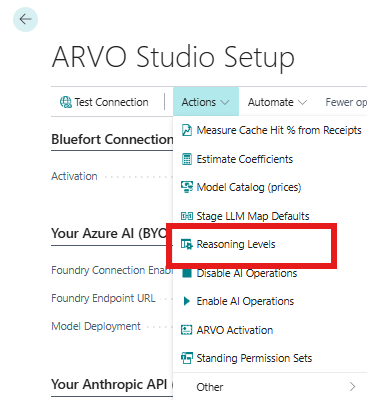
Reasoning Levels give you a simple way to control the AI reasoning configuration used for an ARVO Studio run. These can be setup directly as part of the ARVO Studio setup as below:
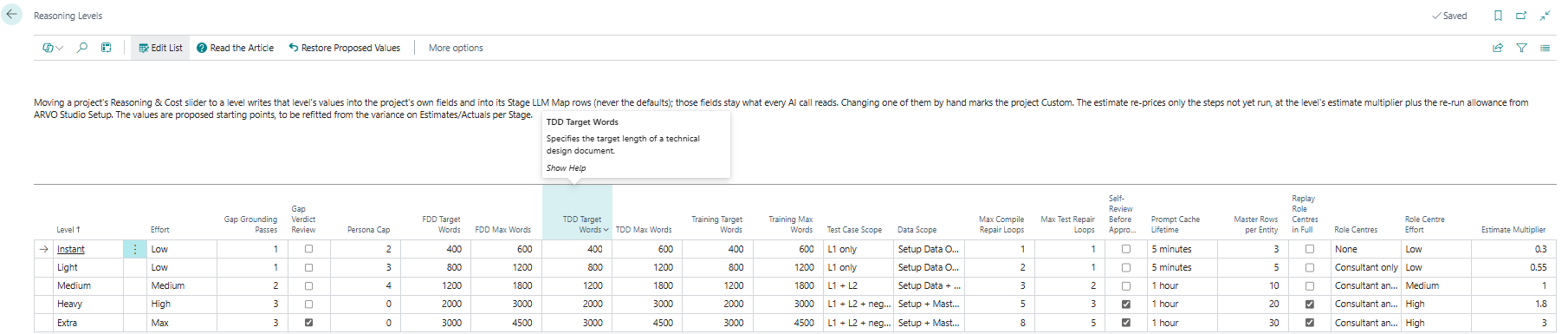
Rather than adjusting individual reasoning parameters each time, ARVO Studio provides predefined levels with seeded default settings. These defaults provide a standard starting point for each level while still allowing individual parameters to be changed when a particular run requires it.
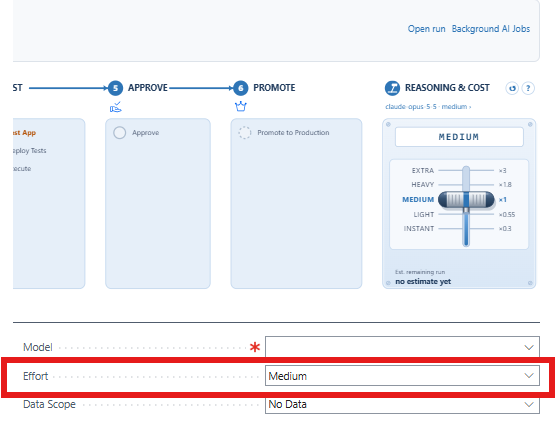
The reasoning lever is available alongside the Compass and reflects the reasoning configuration currently selected for the run.
Reasoning Levels
ARVO Studio comes pre configured with seeded default configurations for its reasoning levels. These defaults determine how the lever behaves and provide the standard configuration associated with each level. These defaults are stored as configuration and depending on the lever value chosen, the configured values are applied when determining the selected reasoning.
Change and adjust the reasoning lever when you want to select one of these standard configurations for a run on the project itself.
Resetting the Defaults
If the reasoning defaults have been changed and you want to return to ARVO Studio’s suggested configuration, use the Restore proposed values button.

How the setup affects users
The reasoning levels configured here are reflected by the lever available alongside the Compass.
When the parameters being used match a configured level, that level is represented by the lever. When a user overrides a parameter and the resulting configuration no longer matches that level, the lever displays Custom instead. This separates two concepts for reasoning levels, namely the setup configuration of the Reasoning levels, and the Project run configuration. The former is defined at setup stage while the latter can defined by the user and overridden on the project card.