At-a-glance
| Purpose | Subscription engine embedded in Dynamics 365 Business Central to manage open-ended and contract-based subscriptions and thus helps automate billing and contract operations. A more detailed feature overview can be found here. |
| Primary personas | Subscription Manager, Finance/AR, Sales Admin, BC Admin |
| Implementation pattern | Install extension → security/roles → baseline configuration (RapidStart recommended) → configure subscription constructs → test E2E flows → data migration (if in scope) → cutover/go-live |
Scope and outcomes
This guide covers end-to-end deployment, configuration, testing, and go-live of LISA Business on Business Central SaaS. It assumes you already know standard Business Central setup concepts and focuses on Bluefort-specific configuration and operating model.
Prerequisites
- Dynamics 365 Business Central SaaS environment(s) provisioned (Sandbox for build/test and Production for go-live).
- BC admin access to install extensions from AppSource.
- LISA Business license available for Production use.
- At least one BC legal entity with users and Finance module (such as Chart of accounts, financial periods, G/L accounts, Ledger posting groups) are pre-configured and ready to use.
- Defined target operating model: subscription sales motions, billing cadence, revenue recognition needs, users and their roles.
Phase A – Install and secure the solution
A1. Install LISA Business extension
- In Business Central, open Extension Management.
- Select Extension Marketplace and search for “LISA Business Custom”.
- Install the extension into the target environment/company.
A2. Assign permission sets and role centre
- Open Users, select the admin user (and other relevant users).
- Assign permission set BFTSUBMANAGER to the admin and to any users requiring LISA access.
- Optionally assign the Subscription Manager role centre to users (self-service via My Settings or via User Settings).
Learning portal Guides for this phase can be found here.
Phase B – Baseline configuration
B1. Load RapidStart configuration packages
Bluefort provides RapidStart packages to accelerate baseline configuration and provide sample subscription items. Use them in Sandbox first to familiarize your team and validate the target model before applying similar setup to Production.
- Download the LISA Business RapidStart ZIP package from Bluefort Learn.
- Import and apply PackageLISA BUSINESS BASE.rapidstart.
- Import and apply PackageLISA BUSINESS SAMPLE.rapidstart (apply twice if the first apply fails due to dependencies).
- Optionally export the package to Excel for review/troubleshooting before applying.
Learning portal Guides for this phase can be found here.
Phase C – Configure subscription constructs
C1. Program Types
Define program types to segment subscription programs (e.g., reseller programs, SaaS plans, support contracts, Telco, VOIP, etc) and enable filtering and reporting.
C2. Subscription Reason Codes and Reason Types (mandatory)
Configure reason codes and reason types (New, Cancel, Upgrade, Downgrade, Renewal). Reason codes are required when creating subscription plans/lines/actions and improve traceability and analytics.
C3. Subscription parameters and master data
- Subscription parameters: numbering, default behaviors, processing flags used by subscription automation.
- Subscription items: define recurring items, one-time fees, and pricing structures.
- Add-ons (optional): attach optional items/services to subscription items.
- Subscription item months (recommended): enable month-based mappings for subscription billing behaviors.
- Deferral templates (optional): for revenue deferrals (if required).
- MEA templates / standalone selling prices / promotions / price indexing (optional, based on customer needs).
Learning portal guides for this phase can be found here.
Phase D – Classification of subscriptions used by the legal entity
D1. Per Unit vs Consumption Subscription Types
As part of solution envisioning it is to determine whether the legal entity requires to use Per Unit subscriptions or Consumption Subscriptions or both. Per Unit subscriptions are billed upfront at the start of the cycle (or before). Consumption Subscriptions are billed in arrears after the billing cycle is over where charges are based on actual usage during the billing cycle.
Furthermore, if consumption subscriptions will be used, it has to envisaged whether basic or advanced consumption subscriptions will be used. In basic consumption subscriptions, the value to bill for the previous billing cycle must be entered manually per billing cycle (or the estimated or minimum consumption is billed). Advanced consumption subscriptions offer advanced logic and integrations with meter readers and meterage consumption records which are typically used by Telcos and ISPs (for usage based billing) and typically imported from external systems such as CRD recordings for VOIP.
If the legal entity requires the advanced consumption subscriptions, an integration or import routine should be envisaged to get the external data to land in the LISA meterage table for processing.
Learning portal guide for this section can be found here.
D2. Open Ended Subscription vs Subscription Contracts
Another important part of solution envisioning is envisioning whether the legal entity will use open ended subscriptions or subscription contracts or both. This is important at defines how subscription plans should be created and managed. For subscription contracts, the contract definition fields should be populated. Also, contrary to open ended subscriptions, contracts will auto cancel when the end of the contract is reached. Open ended subscriptions continue running indefinitely. until manually cancelled.
It is also important to note that the legal treatment of subscription contracts and auto-renewal varies across countries and jurisdictions. In some regions, auto-renewing contracts are subject to specific consumer-protection or commercial regulations, such as requirements for explicit customer consent, advance renewal notifications, or defined opt-out mechanisms. In other jurisdictions, auto-renewal may be restricted or discouraged depending on the customer type and contract structure. As a result, partners should always consider the applicable legal and regulatory context of the customer’s operating jurisdiction before proposing or configuring subscription contracts or auto-renewal behaviour, and ensure that the chosen subscription model aligns with local requirements and customer expectations.
D3. Buying, Selling and Reselling Subscriptions
During solution envisioning it is important to define whether the legal entity just sells subscriptions or does it also purchase subscriptions and potentially even reselling subscriptions. Subscription reselling is also enriched by the Microsoft Dynamics 365 Payables copilot agent, allowing vendor invoices, whether manually entered or automatically ingested—to seamlessly trigger LISA subscription processes within Microsoft Dynamics 365 Business Central.
Learning portal guide for this section can be found here.
Phase E – Operational configuration for billing cycles and contract changes
E1. Calendar vs Rolling cycle types
Confirm whether subscription plans should align to calendar periods (Calendar) or anniversary periods (Rolling). Calendar cycles pro-rate the first period to align to the end of the calendar cycle; rolling cycles align to anniversaries.
Learning portal guide for this section can be found here.
E2. Processing via Sales Orders or via Subscription Cockpit
Confirm whether new subscription plans or changes to existing subscription plans will be processed directly within the subscriptions cockpit or whether changes need to be processed via sales orders. This depends on the business process being applied via the legal entity. LISA Business also has an add-on (licensed additionally) which extends the capabilities of the Microsoft Dynamics 365 Sales order copilot agent where sales orders created by the copilot agent containing subscriptions products are automatically invoiced and converted into either open ended subscription plans or subscription contracts enabling a touchless contract ingestion experience, if this is so desired to be the case for a specific customer of the legal entity.
E3. Contract change management
Enable and test contract changes to avoid cancel/recreate patterns. LISA Business supports adding lines, replacing lines, and optional crediting from a defined date, with validation and action generation during order processing. Contract change management is supported directly from the subscriptions cockpit, via sales orders and from the Bluefort Model Driven app for Dataverse.
Learning portal guide for this section can be found here.
E4. Subscription/Contract cancellation
Subscription cancellation is an important part of the solution blueprint and sometimes it also carries legal ramifications. The cancellation features of LISA Business give organizations flexible, end-to-end control of the subscription lifecycle to match real contractual and accounting needs. They support immediate, partial, reversible, and future-dated cancellations to align with customer agreements and internal policies. “Cancel with Reversal” improves billing accuracy and compliance by reversing selected invoiced periods and issuing credit memos, boosting auditability. Disabling individual plan lines enables granular service changes without cancelling the full plan, while preserving billing history continuity.
Learning portal guide for this section can be found here.
E5. Auditing and tracking
Users should be trained on how LISA Business allow organizations to maintain a controlled, auditable, and transparent record of subscription plan changes throughout their lifecycle, including publication events, pricing changes, cancellations, and system-driven updates. This auditing capability goes beyond standard Microsoft Dynamics 365 Business Central tracking and allows you to compare changes to previous subscription plan versions.
Learning portal guide for this section can be found here.
Phase F – Advanced subscription operations
These configurations are only required if the legal entity being implemented requires these features.
F1. Configure Price Indexing and Price Refresh
This is required if the legal entity requires subscription prices to be automatically increased by a percent amount, automatically decreased by a percent amount or refreshed from the standard Microsoft Dynamics 365 Business Central pricing capabilities.
Learning portal guide for this section can be found here.
F2. Promotions
If the legal entity offers its customers temporary promotional discounts then LISA Business promotions should be configured. Promotion products can be configured to allow flexible promotions based on number of billing cycles for example in Telco it is not uncommon to for companies to offer first three months free to their customers.
Learning portal guide for this section can be found here.
F3. Delivery Schedules and Entitlements
If the legal entity ships physical or digital products as parts of its subscription service then delivery schedules are an important features to be configured, understood and implemented. Delivery Schedules in LISA Business allow you to predefine recurring delivery orders for subscription customers. During subscription processing, LISA Business evaluates active schedules and, when a cycle is due, generates a Sales Order with the correct delivery dates and lines (optionally auto-releasing it).
Some products can also be configured to be free of charged i.e. covered by the subscription while some others need to be invoiced and paid for as per normal pricing rules. The free products are sometimes called Entitlements.
Learning portal guide for this section can be found here.
F4. Event based revenue recognition
If the legal entity being implemented, recognizes revenue based on events then this feature should be implemented. An example of this functionality is when a yearly subscription allows customers to attend a number of conferences or events within that year. Revenue is recognised only when the subscriber actually attends a specific event. Event based revenue recognition can be done based on a template or via an API call from an external system e.g. a conference management system.
Learning portal guide for this section can be found here.
F4. Subscription Payments
LISA Business natively integrates with a payment solution in the Bluefort stack called TAPP. If the legal entity also requires automatic payment processing for subscriptions then this solution should also be licensed, deployed and configured. TAPP has another implementation guide which is separate from this one.
Learning portal guides for TAPP and the various out of the box PSP connectors it supports can be found here.
Phase G – Testing and go-live
G1. Recommended Testing Tools
While manual testing by key users is important, to automate testing and the management of your test library Bluefort recommends using Leapwork in conjunction with Azure DevOps. This is especially recommended if a sub-set of your test cases are not 100% within Microsoft Dynamics 365 Business Central but span multiple systems for example Dataverse and Microsoft Dynamics 365 Business Central. Leapwork also supports A.I. powered testing.
G2. Minimum test scenarios (SIT/UAT)
- Lead-to-quote / quote-to-order / order-to-cash flows for a new subscription.
- Invoice generation and posting aligned to billing cycles.
- Mid-term upgrade and downgrade using contract change management (with and without credits).
- Cancellation scenarios (immediate and future-dated, if applicable).
- Role-based access: Subscription Manager vs other roles.
G3. Cutover checklist
- Production extension installed and licensed.
- Security roles and key parameters replicated from tested baseline.
- Opening balances and master data ready; optional data migration completed (if in scope).
- Support model agreed (hypercare window, escalation path).
Optional – Data migration
If the customer requires migration of existing subscription contracts, decide early whether to migrate: (a) only master data required for new subscriptions going forward, or (b) a portion of the subscription history and but all the open cycles. Define mapping rules for customers, items, subscription plans/lines, billing dates, and revenue recognition artifacts.
Core principles for migrating active subscriptions
- Start by executing a round of UAT testing on new subscriptions / contracts flows and ensure all success criteria are met. In this step the word “new” means that the subscriptions are created from scratch directly in Microsoft Dynamics 365 (starting either from Sales CRM in Dataverse or from within Microsoft Dynamics 365 Business Central).
- After that, import a batch of open/active subscription on a test environment and ensure the success criteria are met even for the data migrated subscriptions. This ensures that:
- The data has been correctly mapped and migrated from the source legacy system to the target system
- The designed processes which were implemented during the analysis, design and configuration phases generate the required outputs even on the data migrated data which originated from the legacy system.
- Finally, execute exactly the same data migration script on the PROD environment to ensure that the newly implemented solution delivers the right outcomes in the live environment. The way the data is migrated to PROD should be more meticulously planned and the strategy detailed out and clarified with all stakeholders. The next section helps you choose a migration strategy.
Choose a migration strategy
- Big-bang cutover (single go-live date/time)
- All active subs are recreated in the new platform; invoicing/renewals switch over at once.
- Best when the estate is manageable and you can freeze changes briefly.
- Phased migration (cohort-based)
- Move customers/subscriptions in batches (by program type, customer group. region, billing cycle, renewal date).
- Lower risk; longer period with dual processes.
- Dual-run with “billing authority” split
- New system becomes source of truth for subscriptions on Day 1 for new contracts or subscriptions while the old system continues to handle open contracts/subscriptions for a short period of time.
- You explicitly define which system is authoritative for: subscription state, invoicing, payments, revenue recognition, dunning.
What success criteria typically looks like
Success criteria should be defined upfront to avoid grey areas or misconceptions. These typically include:
- No missed invoices and no duplicate invoices
- Renewal dates, terms, and pricing are identical to legacy
- Open AR items and credits are preserved (or explicitly handled)
- Payment methods/dunning rules behave as expected
- Subscription lifecycle events (upgrade/downgrade/cancel) are handled cleanly during transition
- Financial reporting (MRR, deferred revenue, tax) ties out pre/post cutover
Data domains you must migrate
For every active subscription plan or contract you typically need to migrate:
- Subscription ID mapping (legacy → new)
- Start date, current term start/end, renewal date
- Billing cycle and anchor date (important: invoice cadence)
- Contractual terms (min term, auto-renew, notice periods)
- Current quantity, tiers, discounts, promotions
- Amendments history (if required) or at least “current effective state”
- Cancellation/expiry details if already scheduled
- Any default payment methods (Direct Debit Mandates, Credit Card Tokens etc)
- Open invoices, AR balance, credit notes
- Prepayments, deposits, wallet balances
- Proration settings and any mid-cycle adjustments pending
- Revenue recognition data / Deferred Balances
- Dunning status (in retry? grace period? last attempt date?)
Target-state design decisions
Before migrating a single record, lock down:
- System of record for:
- Subscription state
- Invoicing
- Payments + dunning
- Taxes
- Revenue recognition / GL postings
- Billing anchor logic
- Do you anchor billing to: subscription start date, month-start, contract signature date, or renewal date?
- How do you handle “bill in advance” vs “bill in arrears”?
- Proration policy
- Keep legacy proration rules exactly, or standardize?
- Treatment of in-flight changes
- Pending upgrades/downgrades
- Scheduled cancellations
- Ramp deals / step pricing
- Usage-based components (need a cutover meter reading)
- ID strategy
- Preserve legacy subscription numbers as external IDs to keep traceability.
Practical Tip: “Recreate state + preserve financial continuity”
Instead of attempting to migrate every historical invoice and amendment event, most teams:
- Recreate current effective subscription state in the new platform (plans, quantities, discounts, term dates).
- Set a billing anchor so the next invoice date matches legacy.
- Bring across open AR/credits either as migrated invoices/credit notes or as an opening balance mechanism (depends on platform/accounting requirements).
- Keep legacy as read-only archive for audit/history.
This is typically the safest and fastest route. In our experience, it is not recommended to migrate the full history.
Architecture Diagrams
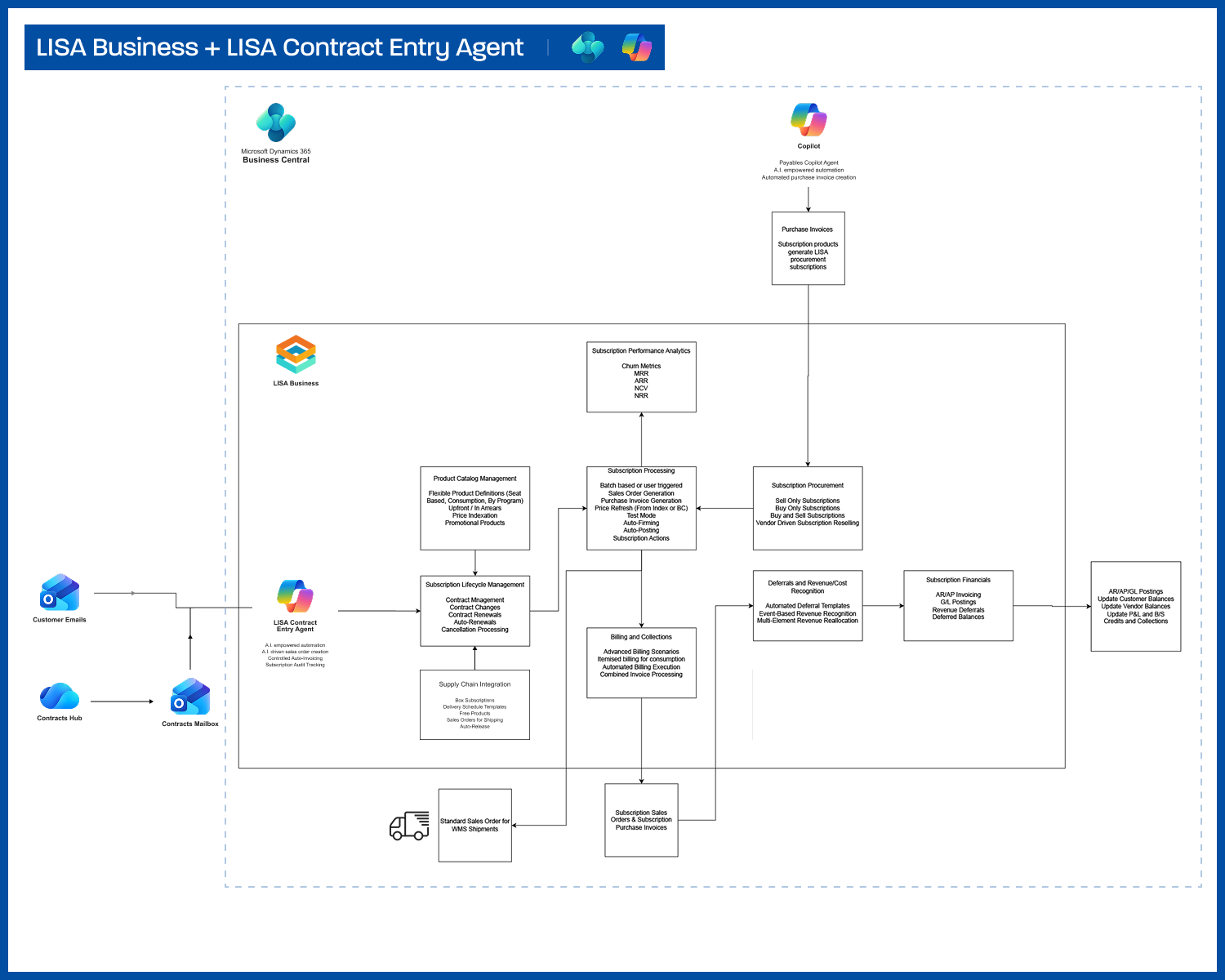
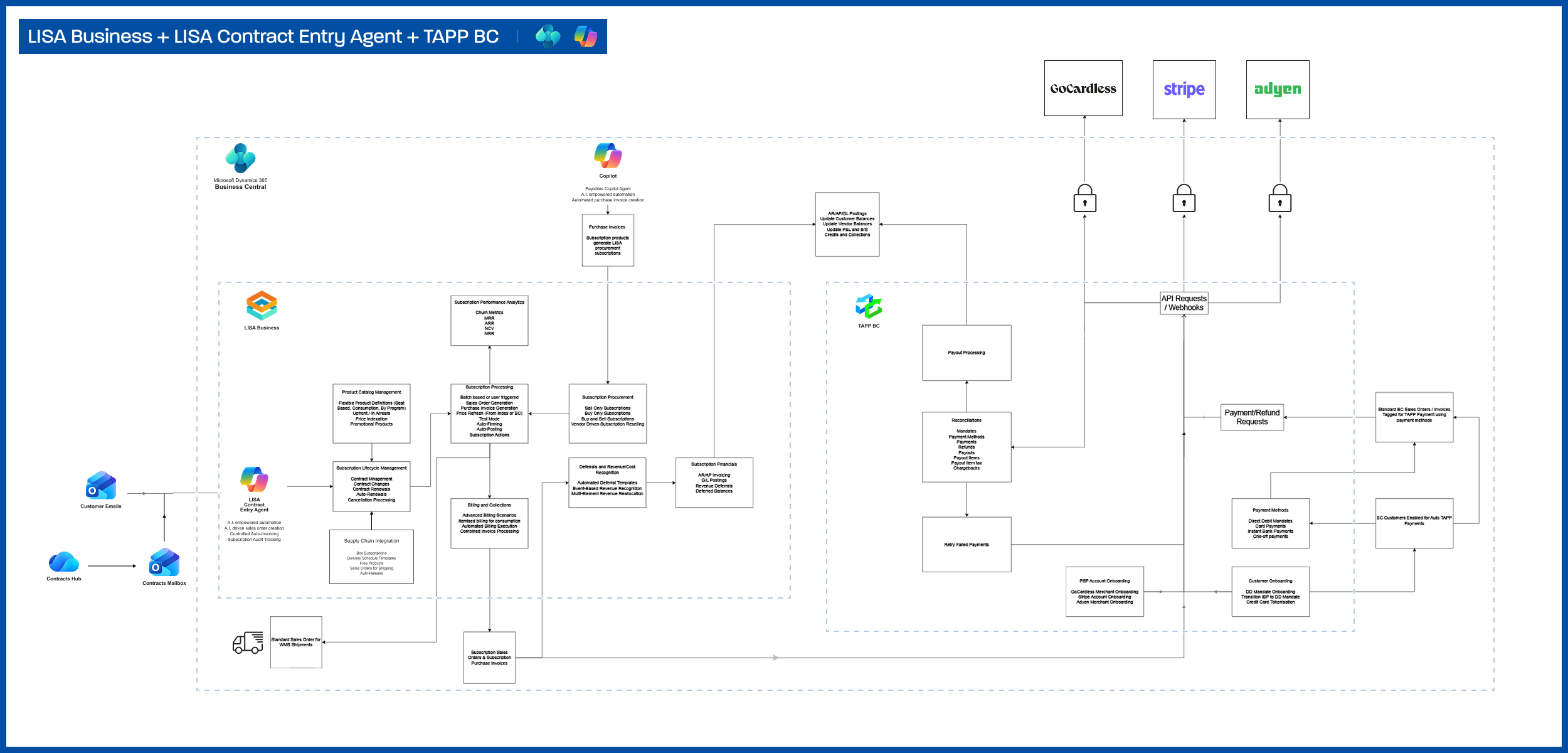
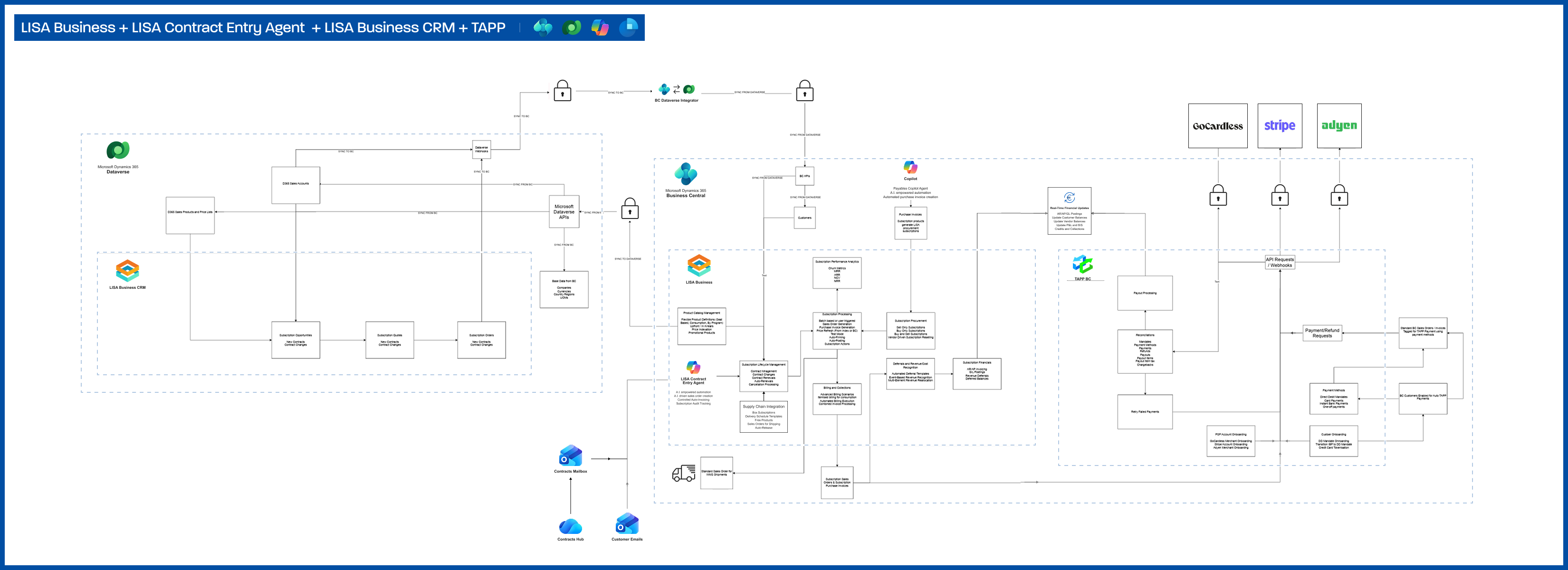
Below you can find architecture diagrams for LISA Business how it relates to other products in the Bluefort SMB portfolio such as TAPP and the Contract Copilot Agent.