
Overview
LISA Business supports two types of cycles for subscription plans. These are:
- Calendar
- Rolling
Business Value
The availability of both Calendar and Rolling cycle types in LISA Business enables precise alignment between subscription billing, contractual terms, and financial policies, while minimizing manual intervention and billing adjustments. By allowing organizations to select the most appropriate cycle model per subscription plan, LISA Business supports a wide range of commercial and operational requirements within a single, standardized framework.
The Calendar cycle type delivers strong financial governance by aligning billing periods strictly to calendar boundaries after an initial pro-rated period. The automatic pro-rata calculation for the first cycle ensures that customers are charged fairly for partial periods, while subsequent cycles align cleanly with standard monthly or yearly accounting periods. This simplifies revenue recognition, period-end reconciliation, and financial reporting, and reduces the risk of overlapping or misaligned billing periods.
The Rolling cycle type supports anniversary-based subscriptions where consistency of service periods is paramount. By maintaining fixed-duration cycles that roll forward from the subscription start date, this model ensures predictable and contractually accurate billing. Pro-rata calculations are applied only when a contractual or global end date interrupts a cycle, preserving billing integrity while ensuring accurate final charges in line with contractual termination terms.
Together, these cycle types provide businesses with the flexibility to support both calendar-driven and contract-driven subscription models, improve billing accuracy and transparency, and ensure compliance with accounting and contractual obligations. This capability enhances customer trust, reduces operational complexity, and enables scalable subscription management across diverse products and customer segments.
Calendar Cycle Type
In subscriptions where the Cycle Type is set to Calendar, the first cycle always aligns to the end of the calendar cycle e.g. to the end of the month if the Billing Cycle Type is Monthly or to the end of the year if the Billing Cycle Type is Yearly. For this first period the billing amount is calculated pro-rata depending on the number of days remaining in the cycle. From the second cycle onwards the cycle dates align exactly to the calendar and does never overlap calendar periods. An example of a monthly calendar cycle type would be as follows:
Cycle 1: 15th March to 31st March
Cycle 2: 1st April to 31st April
Cycle 3: 1st May to 31st May
…. and so forth.
For subscription with Cycle Type = Calendar, LISA Business also supports combining the first billing cycle with the second which is common practice in some industries such as Telco.
Rolling Cycle Type
In subscriptions where the Cycle Type is set to Rolling, the cycles always align to the cycle length of the billing period on its anniversary and rolls forward as such. It is not aligned to the calendar. A Pro-rata calculation only comes into play if the cycle is interrupted by a contractual/term Global End Date which is configured in the Renewal Options of the subscription plan. An example of a monthly rolling cycle type would be as follows:
Cycle 1: 15th March to 14th April
Cycle 2: 15th April to 14th May
Cycle 3: 15th May to 14th June
…. and so forth.
Pro Rate By Days
On the Subscription Plan Line, once finds the Pro Rate By Days field. This field influences the pro-rata calculation. If set to true, the calculation is based on the number of days divided by the total number of days. If switched off, the calculation is based on the number of remaining periods divided by the total number of periods. e.g.
- for a yearly calendar subscription with a value of £1000 starting on 1st July with the Pro Rate By Days field turned on the calculation would be 184/365 X £1000 = £504.11
- for a yearly calendar subscription with a value of £1000 starting on 1st July with the Pro Rate By Days field turned off the calculation would be 6/12 X £1000 = £500
Combine first billing cycle for Calendar Subscriptions
This functionality allows the system to skip the posting of the initial sales order when using calendar-based billing and instead create or update a subscription plan directly.
The first billing cycle is therefore postponed and combined with the next billing cycle, ensuring correct calendar alignment. This is common practice in some industries such as Telco.
This is typically required when a subscription starts mid-period, but billing must follow full calendar cycles.
The feature is controlled through a combination of:
Subscription plan parameters -> Postpone Billing flag, which acts as the default behaviour for all subscription plans where Cycle Type = Calendar.
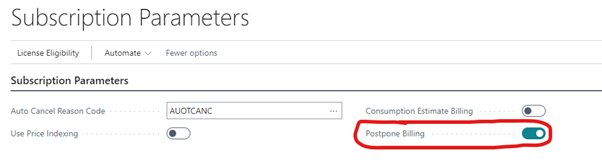
Sales order -> Postpone Billing flag, which is the transaction-level override per sales order.
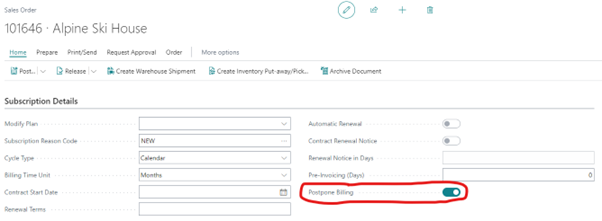
When the flag is active on a sales order:
- The standard posting process is skipped
- A subscription plan is created or updated using the sales order details without processing any cycles
- The manually created sales order is archived and deleted
When the subscription processor is executed for the first two cycles for plans created or modified via this functionality:
- Actions are generated for the relevant billing periods
- Actions of the first (or next in case of modified plan) cycle are not automatically firmed until the cycle after
- Actions of the next two cycles share the same posting date
- A single sales order is created containing the lines for the two cycles