
Introduction
When questions about a specific change that is now running on a Production environment arise, on the lines of how, when and who approved it, the Receipt is the answer. It is the project’s permanent history, built up while the work happens rather than assembled afterwards from memory.
This article explains what is recorded, when the record is sealed and who keeps the evidence.
What is recorded
Events are recorded as the project progresses and that includes the documents attached to the project, the generation of the design documents and the solution design contents, the approvals given at the required gates and the promotion itself, each with the person responsible and the time it happened. Because the record is written as the work progresses, the order of events is visible in one place instead of being spread across mailboxes, tickets and meeting notes.
The project’s Receipt tab includes Object Ledger, Receipt Log, Receipt Snapshot, Print Receipt Report and Print Receipt. Use Receipt Log to examine the event history and Receipt Snapshot when you need a point in time view. Object Ledger is another available view to inspect alongside the project record. Choose the view that helps answer the questions of the reviewer the best, rather than assuming all of them contain the same information.
Use Print Receipt Report or Print Receipt to prepare a printable record, then preview what the selected action actually produces the information needed. Check the project identity, the position covered, the dates and the approvals before you share it. Do not assume that either of the print actions automatically include every document, every run outcome or all data preparation records.
Refresh Estimate is another function also available on the Receipt tab. It allows for reviewing the project’s usage estimate and it should not be confused with producing a complete auditing record. Read Object Generation and Token Estimation for the rate, estimate and actual usage checks.
When the record is sealed
Promotion is allowed only when the required gates are green and the entitlement is valid. When promotion completes, the project record is sealed and the receipt stands as the evidence of what was designed, tested, approved and released. That sealed record is the point of reference for any later questions about the changes made.
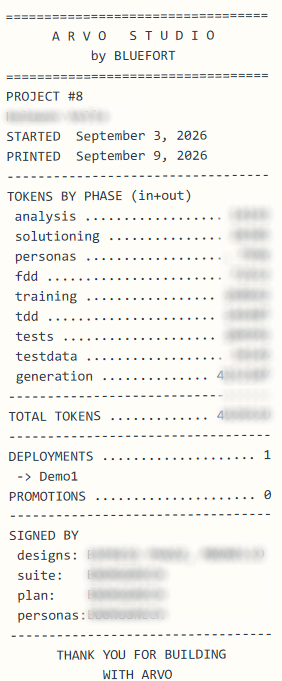
The evidence belongs to the customer
The receipt is the customer’s asset, not a Bluefort report about the customer. It stays with the project in the environment, and the evidence pack produced from it can be filed alongside the customer’s own change and release documentation. If governance requires proof that a change was designed, tested and approved before it reached Production, that proof is already there and does not have to be reconstructed.