
Stripe periodically applies platform-level billing fees directly to your Stripe balance. These fees are separate from the standard transaction processing fees charged on individual customer payments and may relate to Stripe subscriptions, usage-based services, or additional Stripe products.
This article explains how Stripe billing fees are processed, how they appear within Business Central, and the steps required to reconcile them.
Configuration Parameters Requirements
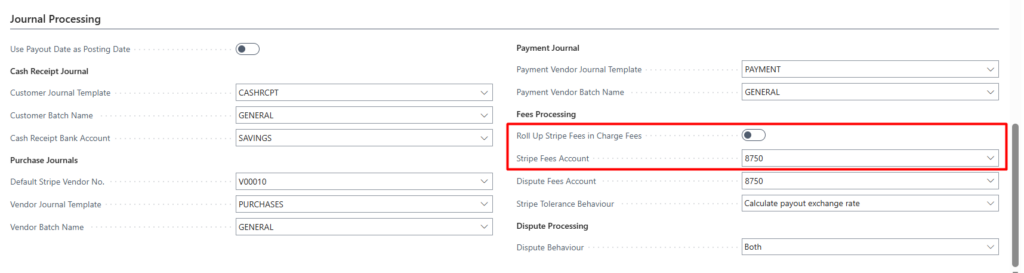
Before Stripe billing fees can be processed, the required setup must be completed within the Stripe Parameters as follows;
- Stripe Fees Account: determines where the Stripe billing fee expense is posted.
- Roll Up Stripe Fees in Charge Fees: controls how Stripe billing fees appear within the Purchase Journal. If Enabled, Stripe Fees are combined into the charge-related fees else, if Disabled, a journal line is created per Stripe Fee.
Sandbox: Adding Stripe Fees
Stripe does not currently provide a way to generate or simulate Stripe platform billing fees within a Stripe Sandbox environment. To support testing and validation of the Stripe fee reconciliation functionality, TAPP Stripe includes a dedicated sandbox-only testing mechanism that allows users to create simulated Stripe billing fee transactions. These test fees behave in the same way as real Stripe billing fees during payout reconciliation.
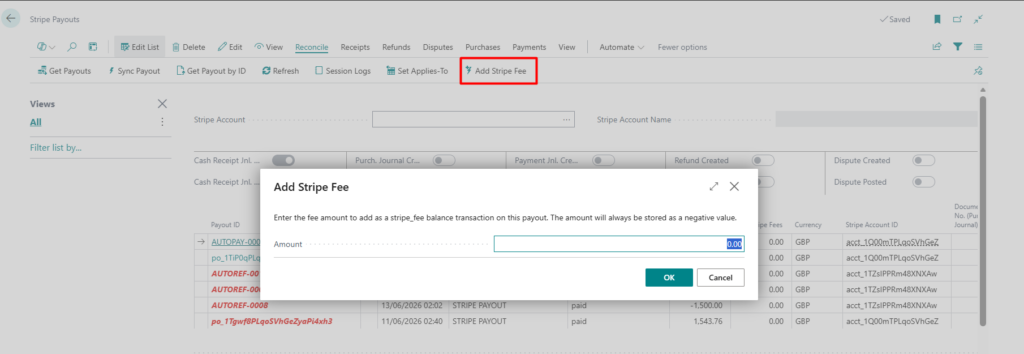
To add a Stripe Fee to a payout:
- Select the payout in which a Stripe Fee should be added
- Click ‘Add Stripe Fee’ from within the Reconcile menu
- When prompted, add the Stripe Fee Amount and click OK
Journal Processing
Cash Receipt Journal, Purchase and Payment Journal processing remains the same i.e. journals are created and posted wither manually from the Payout screen or through the automated Payout Posting. Below is an overview of how Stripe Fees feature in each journal;
| Journal | Result including Stripe Fees |
| Cash Receipt | Stripe Fees do not feature in the Cash Receipt. Stripe fees are handled entirely through the Purchase Journal and Payment Journal processes. |
| Purchase Journal | Depending on the Roll Up behavior selected witin the Stripe Parameters, the Stripe Fees feature either as a sepearye journal line per Stripe Fee or combined within the Charge Fees |
| Payment Journal | The payment journal includes the Stripe Fees as an individual line, balancing against a Bank Account. |