
Introduction
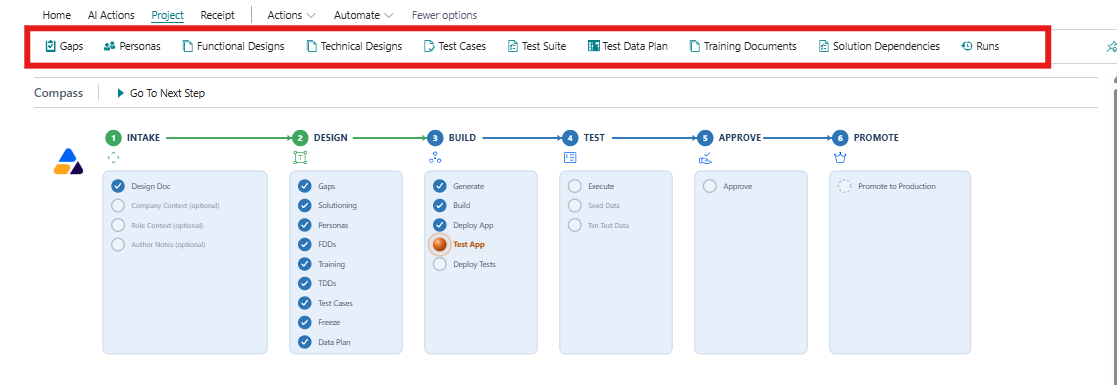
The Project tab exposes the records behind the lifecycle: gaps, personas, functional and technical designs, test cases, the test suite, the test data plan, training documents, solution dependencies and runs. This page describes each list in turn so you know where to look when you have a specific question.
Most of these lists are produced by the work of a stage rather than typed in by hand, so treat them as the project’s record of what exists and where it sits.
Gaps
The gap list holds what the analysis of the design document found and the points where the requirement is not met by standard Business Central and the installed apps. It is the starting point for the solution design, where each gap is identified and given a means and ways of being handled, including any procuring versus building recommendations. Read it to check that the analysis has understood the requirement before the designs are drafted.
Every gap carries the decision to build it, defer it, reject it, do it manually or use existing IP. A gap can also be excluded from scope, and an excluded gap takes no further part in the rest of the process, so use the list to observe both what was found and what will be carried forward.
Personas
Personas are the roles used later in testing. ARVO proposes them and you confirm them, so this is a list you act on rather than simply read. Role context supplied at intake is what these personas are built from, which is the practical reason for attaching it.
Functional designs
The functional design documents describe what the solution will do in business terms. Use the list to see which designs exist and which part of the requirement each one covers. These are for review and approving the designs is an act in itself, and it is the point at which the tests are frozen.
The Business Solution Architecture document sits alongside these approved designs and it is produced by the solution design process and, with its technical counterpart, replaces the combined design documents generated previously.
Technical designs
The technical design documents exist alongside the functional ones and describe how the solution is to be constructed. They follow the functional designs, so it is best if these are reviewed together rather than in isolation.
The Technical Solution Architecture document is produced in the same step as its business counterpart and describes the shape of the solution as a whole rather than a single requirement.
Test cases
Test cases are created from the approved designs and the acceptance criteria, before any code exists. Use the list to confirm that the behaviour you care about is covered. Coverage here is the single best predictor of whether the finished solution will be trusted.
Test suite
The test suite is the approved set of tests that the build must satisfy. Once the designs are approved the suite is frozen, and it is not rewritten to make failing code pass. Treat it as the contract for the project rather than as a working document.
Test data plan
The test data plan sets out the seed data and the transactional data used when the tests run. Seed data is the stable baseline that remains available between tests; transactional test data is created for an individual test and then rolled back, so runs are repeatable and the sandbox stays clean.
Training documents
Training documents are the end-user documentation drafted for the solution. They form part of the evidence the approver reviews, so check that they exist and are current before approval rather than after it.
Solution dependencies
This list records the dependencies associated with the solution and should be reviewed when you need to understand what the generated application relies on in the target environment.
Runs
Runs holds the project’s execution history, and it is the list you will use most often. Every action that has been carried out on the project appears here, with its status and the results it produced, so Runs is the place to answer questions such as what has already been done, whether it succeeded and what came out of it.
Runs is also where results stay after the work has finished. A background job leaves the active queue once it completes, but its results remain in Runs, so an empty Background AI Jobs page does not mean there is nothing to look at.
When something stops for human review, Runs stores the record of what happened and how far the work reached. Read it before repeating an action, because the history usually tells you whether the previous attempt got far enough to be worth continuing from.
Runs is a record to review rather than a list to edit. Nothing in it is changed manually, which is what makes it dependable as history.
Consultant Notes
Consultant Notes can be recorded against gaps, training documents, functional design documents and technical design documents. A note is your own comment on that record, and it is taken into account when the artefact is next regenerated, so a correction is recorded once rather than repeated each time the work is refreshed.
Functional design documents and technical design documents can each be excluded from scope as well, in the same way as a gap, and an excluded document takes no further part in the process.