
Introduction
Reasoning Levels give you a simple way to control the AI reasoning configuration used for an ARVO Studio run. These can be setup directly as part of the ARVO Studio setup article Configure Reasoning Levels.
Reasoning Levels
ARVO Studio comes pre configured with seeded default configurations for its reasoning levels. These defaults determine how the lever behaves and provide the standard configuration associated with each level. These defaults are stored as configuration and depending on the lever value chosen, the configured values are applied when determining the selected reasoning.
Change and adjust the reasoning lever when you want to select one of these standard configurations for a run on the project itself.
Overriding a Reasoning Level
A selected reasoning level does not prevent individual parameters from being changed on the project. For example, if Medium is selected and you change one of its underlying parameters in the configuration table, the lever changes to Custom on the Compass.
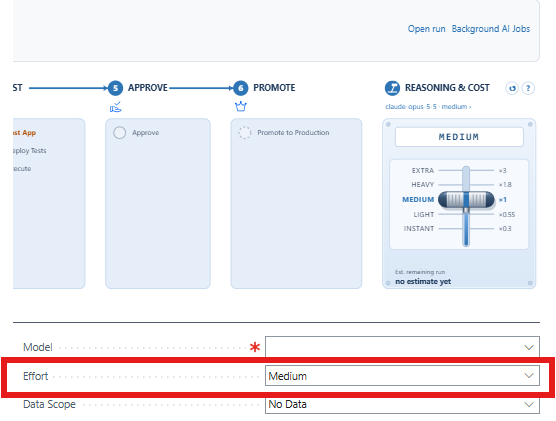
The override can therefore be used when the standard level is suitable as a starting point but a particular run needs a different value.
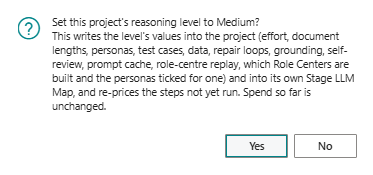
Overriding the Reasoning level via the lever or the Effort lookup field will ask for user confirmation. This confirmation ensures that the user is aware that the re-pricing is only done on the steps not yet run.
Reasoning and Cost
Changing a reasoning configuration can also affect the estimate associated with the run. After changing the configuration, ARVO Studio allows the cost to be re-estimated.
This is particularly useful after moving away from one of the standard levels and creating a Custom configuration. Re-estimating lets you review the updated estimate before proceeding with that configuration.
In practice
A good workflow around Reasoning levels and their configuration is portrayed below:
- Select the reasoning level appropriate for the run.
- Review the configuration of that specific level
- Override an individual parameter only where the run requires it.
- If the lever changes to Custom, review what has been changed.
- Re-estimate the cost after changing the reasoning configuration.
- Continue with the run once you are satisfied with the configuration and estimate.