
Introduction
The Build step exists to turn the approved design into working software – a compiled solution app, and the companion test app that will run the test suite against it. This article explains what happens in the stage, what you are expected to do while it runs, and the gate that has to be satisfied before testing can start.
There is little manual work here. Most of the stage is a matter of watching progress and dealing with the exceptions if they arise.
The steps
The stage moves through five steps.
| Step | What happens and what you do |
| Generate | ARVO generates the solution against the target environment’s current symbols, using the configured object range and prefix. |
| Build | The solution is compiled. If compilation fails, ARVO can make a limited number of repair attempts. If it still cannot compile, the run stops for human review. |
| Deploy App | The generated solution app is installed into the sandbox. |
| Test App | ARVO generates the companion test app for the approved test suite. |
| Deploy Tests | The test app is installed into the sandbox so the approved tests can run. |
You can follow progress on Background AI Jobs, which shows the active jobs with their status, start time and any error text. Completed jobs leave the active queue, but their results remain in Runs, so nothing is lost when a job disappears from the list.
If compilation fails, ARVO can make a limited number of repair attempts. If it still cannot compile after those attempts, the run stops for human review rather than being forced through. When that happens, follow the guidance on parked runs, which explains what you can see and how to resume once the problem has been dealt with.
The gate
The gate for Build is a clean compile with both the solution app and the test app deployed to the sandbox. All three parts matter. The solution has to compile, the solution app has to be installed in the sandbox, and the test app has to be installed alongside it so the approved tests can run. Both apps are installed into the sandbox; nothing is installed into Production at this stage.
To review the progress you can use Background AI Jobs which shows the active jobs. Use Runs to review execution history and outcomes, and compare the project’s actual AI usage with the estimate. If work stops for human review, resolve the issues through the project’s review process rather than assuming a stopped run can be treated as complete.
Review the generated business role centres against the personas in the approved design and ask whether the intended user can find the work they need and recognise what to do next. Keep this review separate from the ARVO Studio role centre used to manage the project.
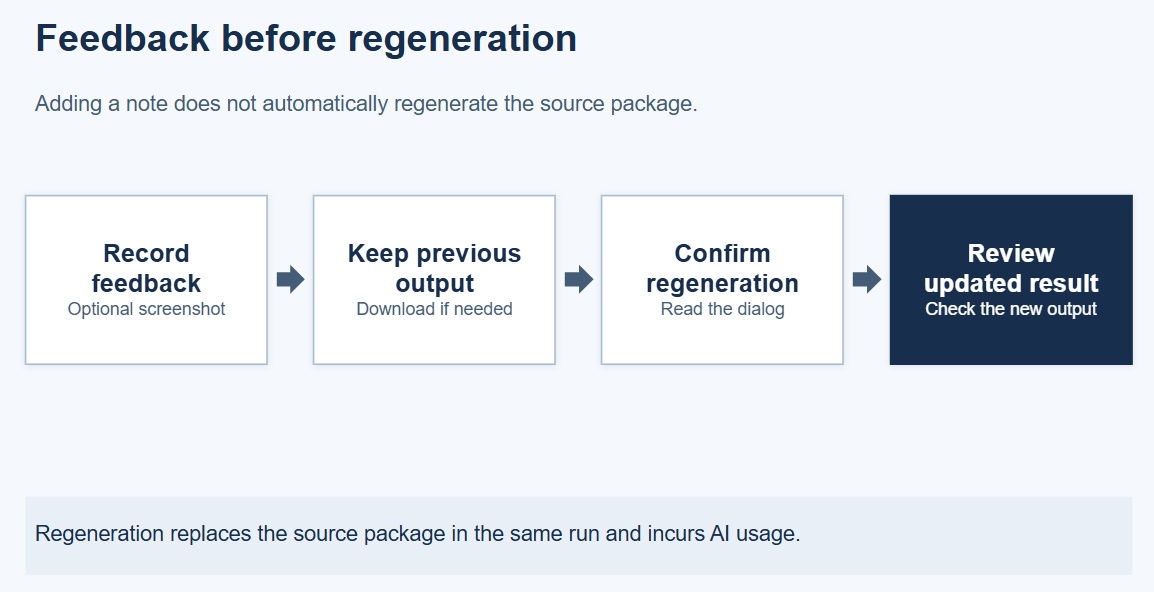
From the build run, click on Feedback for Next Generation and in here record a Note that explains the issue and the expected result. Add enough context for another reviewer to understand the business requirement without recreating your whole session. Use Attach Screenshot where an image is needed, add a Screenshot Caption and use View Screenshot to check the attachment. Use demo information only and always exclude customer personal data and readable generated content.

The feedback list shows Created By, Created At and Carried Into Run, as well as the screenshot indicator. These fields help you see who raised the note and whether it has been carried into a run.
Regeneratation
If a new generation is required, first keep the existing source package in an approved storage if you need it for comparison purposes. Choose Regenerate Source and read the confirmation. It states that regeneration replaces the source package in the same run while retaining the run’s number, trail and notes. Notes not yet carried are included in regeneration, and every regeneration is a full generation that consumes AI tokens.
Confirm only when you intend to replace that package and use more AI tokens. Then check the run outcome and review the resulting output. Prepare and review demo data using Configure and review demo data, then continue with the separate Test stage shown by the Compass.
Who approves
The gate is satisfied by the run rather than by a person, and there is no sign-off at this stage. Your part is to keep an eye on progress, to act if the run stops for human review, and to compare the tokens consumed with the estimate shown on the project card, since AI usage is charged to the customer’s own AI account.
What is added to the project record
The run and its outcome are added to the project history in Runs, together with the tokens consumed against the estimate that was shown before generation started. The sandbox now holds the generated solution app and the test app. Generation is a material event, so it appears in the receipt with the user and the time.