Introduction
This article will guide you through the process to synchronize Stripe Refunds, Disputes, Checkout Sessions and Charges
Stripe Refunds are a way to return money to customers after a successful payment has been processed.
Disputes are claims filed by cardholders or issuing banks regarding a payment.
Checkout Sessions are a programmatic representation of what your customers see on a payment form. They serve as the backend for multiple Stripe payment UIs and manage the full checkout lifecycle for you.
Stripe Charges represent completed payments in your Stripe account. When a customer successfully pays for a product or service, Stripe creates a charge object that contains details about the transaction.
All the above Stripe artifacts have their own lifecycle and statuses. Changes to these statuses are represented by Stripe Events.
Set up Automated Reconciliation of Refunds, Disputes, Checkout Sessions and Charges
Automated reconciliation of aforementioned Stripe data can be set up through the use of Job Queues.
Job Queues are automatically initialized upon installation of Stripe for Dynamics 365 Business Central – TAPP but can also be manually created.
The Job Queue that reconciles Stripe Events is the one set up as follows;
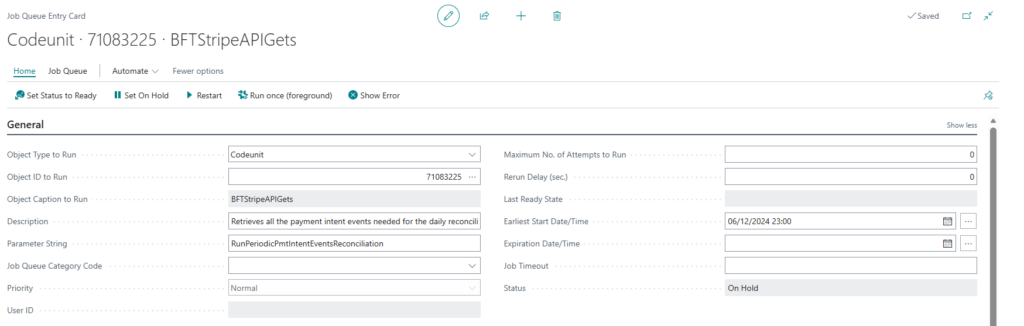
Make sure that the Parameter String is set to exactly RunPeriodicPmtIntentEventsReconciliation
The reconciliation period taken in consideration is calculated according to the value set for the Events Reconciliation Period within the Stripe Parameters.
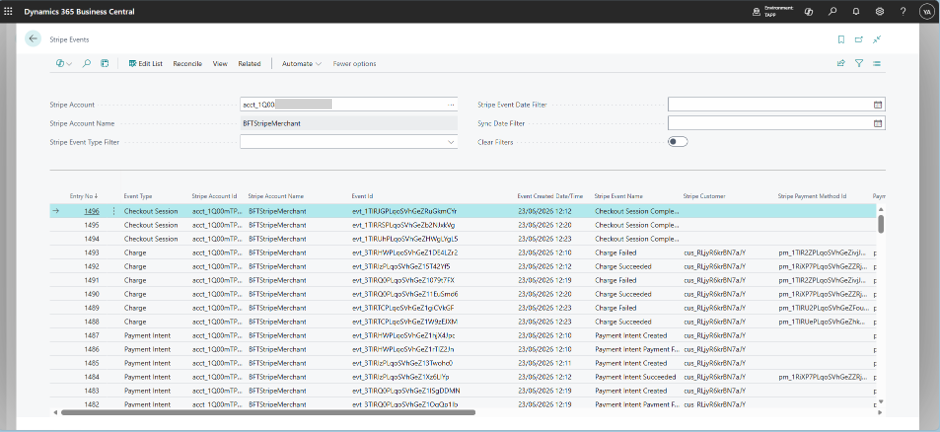
All the reconciled Stripe Events are visible by navigating to the Stripe Events page.