
The below article gives an overview of the parameters used in TAPP Stripe for Dynamics 365 Business Central and their definitions.
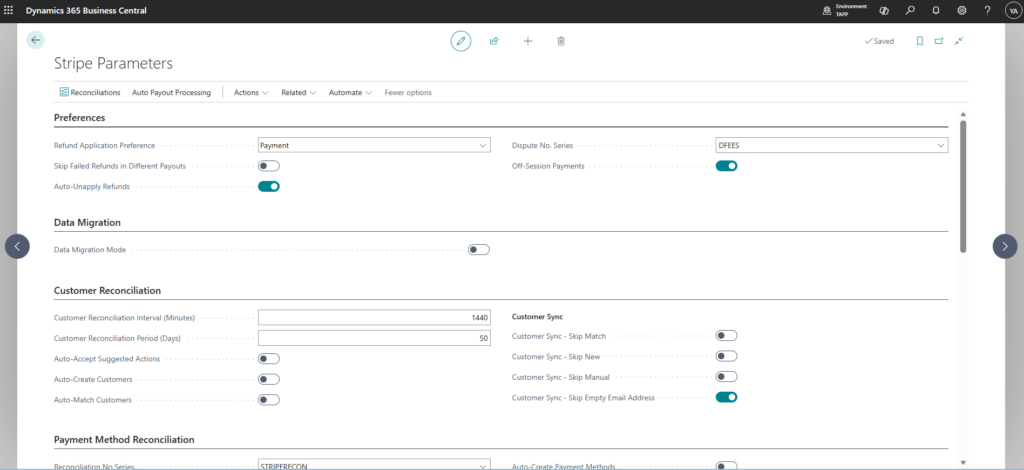
Preferences Section
| Parameter Name | Definition |
|---|---|
| Refund Application Preference | Defines the preference on how to handle refund processing in payouts. This can either be set to Payments or Credit Memo. |
| Skip Failed refunds in Different Payouts | Determines whether failed refunds in different payouts are skipped from processing. |
| Auto-Unapply Refunds | Determines whether refunds should be automatically unapplied when being reversed due to Refund Funds Returned in payouts. |
| Dispute No. Series | The No. Series to use in the journal when processing the dispute fees in the payouts. |
| Off-Session Payments | When enabled, off-session payments will be used for payments. (See more information here) |
Data Migration Section
| Parameter Name | Definition |
|---|---|
| Data Migration Mode | Enables the migration mode. Use this only when you are setting up TAPP for the first time or onboarding a new Stripe Account. |
Customer Reconciliation Section
| Parameter Name | Definition |
|---|---|
| Customer Reconciliation Interval (Minutes) | Specifies the interval of the job running the reconciliation in minutes. Ex. if 1440 – customer reconciliation will run daily |
| Customer Reconciliation Period (Days) | Specifies the period of the days to reconcile the stripe customers. Ex. if 5 – get all customers in the date range Today – 5 |
| Auto-Accept Suggested Actions | Automatically accept the suggested actions during reconciliation. This option is disregarded if Data Migration Mode is ON. |
| Auto-Create Customers | Automatically create a new Business Central Customer when the Suggested Action is NEW during customer reconciliation. This option is disregarded if Data Migration Mode is ON. |
| Auto-Match Customers | Automatically match the Stripe Customer to the suggested BC Customer when the Suggested Action is MATCH during Customer Reconciliation. This option is disregarded if Data Migration Mode is ON. |
| Customer Sync -Skip Match | Skip customer sync records that are suggested as Match |
| Customer Sync – Skip New | Skip customer sync records that are suggested as New |
| Customer Sync – Skip Manual | Skip customer sync records that are suggested as Manual |
| Customer Sync – Skip Empty Email Address | Skip customer sync records that do not have email address |
Payment Method Reconciliation Section
| Parameter Name | Definition |
|---|---|
| Reconciliation No. Series | Specifies the payment method reconciliation number series. |
| Payment Method Reconciliation Interval (minutes) | Specifies the payment method reconciliation interval of the job running the reconciliation in minutes. Ex. if 1440 – payment method reconciliation will run daily. |
| Payment Method Reconciliation Period | Specifies the period of the days to reconcile the stripe payment methods. Ex. if 5 – get all payment methods in the date range Today – 5 |
| Payment Method Auto-Accept Suggested Actions | Specifies whether payment methods are automatically accept suggested actions. |
| Auto-Create Payment Methods | Specifies whether payment methods are automatically created. |
| Auto-Match Payment Methods | Specifies whether payment methods are automatically matched. |
| Auto-Retry Payment Intent upon Reconciling new payment method | Specifies whether payment intents are auto-retried with a newly reconciled payment method |
Payment Intents/Checkout Reconciliation Section
| Parameter Name | Definition |
|---|---|
| Payment Intent Reconciliation Date | Specifies the period to take in consideration when reconciling payment intents. |
| Checkout Session Period | Specifies the period to take in consideration when reconciling checkout sessions |
Events Section
| Parameter Name | Definition |
|---|---|
| Events Reconciliation Period | Specifies the period to take in consideration when reconciling Stripe Events. |
Payout Reconciliation Section
| Parameter Name | Definition |
|---|---|
| Payout Reconciliation Interval (Minutes) | Specifies the payment method reconciliation interval of the job running the reconciliation in minutes. Ex. if 1440 – payout reconciliation will run daily. |
| Payout Reconciliation Period (Days) | Specifies the period to take in consideration when reconciling Stripe Payouts. |
| Use Rolling Payout Reconciliation Period | When enabled, the Payout Reconciliation Period is applied as a rolling window from the current date and time, instead of from the start of today. |
Journal Processing Section
| Parameter Name | Definition |
|---|---|
| Use Payout Date as Posting Date | When enabled, the payout date will be used as the posting date for the journal entries. |
| Customer Journal Template | The default template name to use when creating a cash receipt journal during payout processing. |
| Customer Batch Name | The default batch name to use when creating a cash receipt journal during payout processing. |
| Cash Receipt Bank Account | The default bank account to use when creating the Cash Receipt during payout processing. |
| Default Stripe Vendor No. | Specify the vendor No to be used for Stripe fees. |
| Vendor Journal Template | The default journal template to use when creating a purchase journal for fees during payout processing. |
| Vendor Batch Name | The default batch name to use when creating a purchase journal for fees during payout processing. |
| Payment Vendor Journal Template | The default journal template to use when creating a payment journal to process the payout fees. |
| Payment Vendor Batch Name | The default batch name to use when creating a payment journal to process the payout fees. |
| Roll Up Stripe Fees in Charge Fees | When enabled, the Stripe fees will be rolled up into the charge fees for the journal entries. |
| Stripe Fees Account | The G/L account to use when processing the payout fees. |
| Dispute Fees Account | The G/L account to use when processing dispute fees in a payout. |
| Stripe Tolerance Behaviour | Select the behaviour the system should adopt when encountering currency differences: 1 – Calculate payout exchange rate will calculate the exchange with the following formula: Stripe Payout item net amount / Customer ledger entry Amount LCY. 2 – Calculate tolerance between Business Central and Stripe will create a tolerance line in the cash receipt if there is a tolerance between Business Central and Stripe exchange rates. |
| Dispute Behaviour | Specifies what the system should do when a Dispute is received and processed during payout processing. 1 – Unapplies the payment from the invoice. 2 – Creates a credit memo for the original invoice. 3 – Unapplies the payment from the invoice and also creates teh credit memo. |