
Introduction
ARVO Studio is a governed build automation tool for Business Central and allows for an engineered, tested and deployable solution. It is a Business Central application that takes a solution design document through analysis, design, generation, testing, approval and gated promotion, and keeps a sealed snapshot of what happened at every point along the way.
This article explains what the product is and what it does from a user’s point of view. If you are deciding whether to start using ARVO Studio, read this first, then move on to licensing and installation.
The problem ARVO Studio addresses
Custom development on Business Central is slow, expensive and difficult to govern consistently. Requirements are agreed in a design document, but what finally reaches Production is rarely traceable back to that document. Testing depends on whoever is available while approvals happen in email. When a customer or an auditor asks what was built, why it was built and who signed it off, the answer usually has to be assembled after the fact.
ARVO Studio turns that into a repeatable, controlled process. The design document is the starting point, the work is produced against it, and the approvals and evidence are captured as the project moves forward rather than reconstructed at the end.
What ARVO Studio does
You create a project and attach your solution design document. The project then moves horizontally through the stages of the build life cycle. Each stage contains named steps, and each stage has a gate that must be satisfied before the next stage can start. A person approves the required gates – ARVO Studio does not carry work forward on its own.
Across the top of every project is the Compass, which shows the current project stage and highlights the current step, while telling the user in plain words what to do next. Completed steps fill in as you go, so the state of the work is visible at a glance.
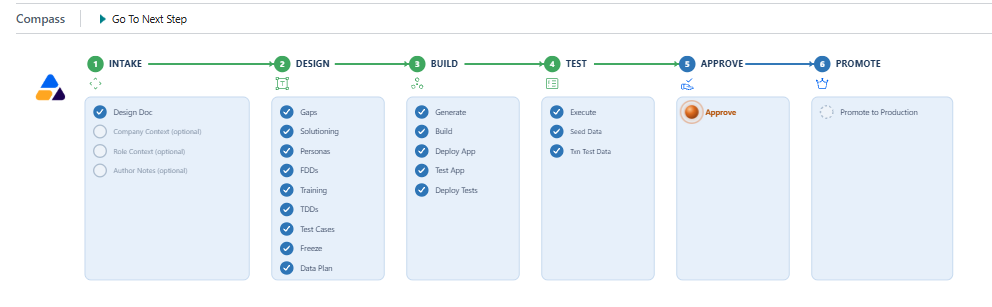
Three rules that always apply
These three rules shape everything else in the portal, so it is worth knowing them before you go any further.
- ARVO Studio runs in sandbox environments only. It is installed into a sandbox and it operates there. Production is never a valid environment for ARVO Studio or for the generated test app.
- AI runs on the your own / your customers’ account so ARVO Studio connects to that Azure AI Foundry deployment or Anthropic account, and the usage is billed accordingly. Bluefort does not supply, resell or absorb AI capacity, and AI usage is not included in the ARVO Studio fee.
- Production receives only the final approved solution app, through the gated process. Nothing reaches Production until the required approvals have been given.
Project evidence and deliverables
A completed project is not only an application. Along the way it produces the artifacts which the delivery teams and the customers normally need: functional and technical design documents, test cases and a test data plan, end user training documentation, the generated solution app, and the record of who approved what and when. These are held within the project, so the process of the build is always alongside the outcome of the build.
The user remains in control throughout the process and every gate is confirmed by a person. Every approval is recorded, so the environment owner can stop AI operations at any time to verify, while the whole process runs in a sandbox until the approved solution app is promoted forward.