Data Flow
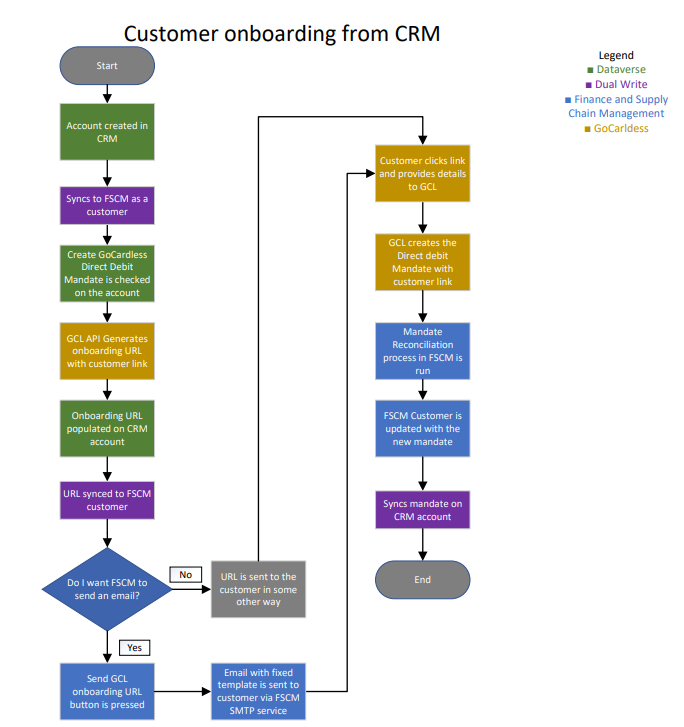
The Data Flow diagram below shows how data flows between the different systems. Dataverse and Finance and Supply chain Management always communicate via DualWrite. In this scenario it is used to synchronize customer data as well as the GoCardless Mandates between the two systems.
For communication with GoCardless it is done via API calls. This is done by both FSCM and Dataverse based on where the user is interacting with as can be seen clearer in the later diagrams of the customer onboarding process.
Merchant Onboarding
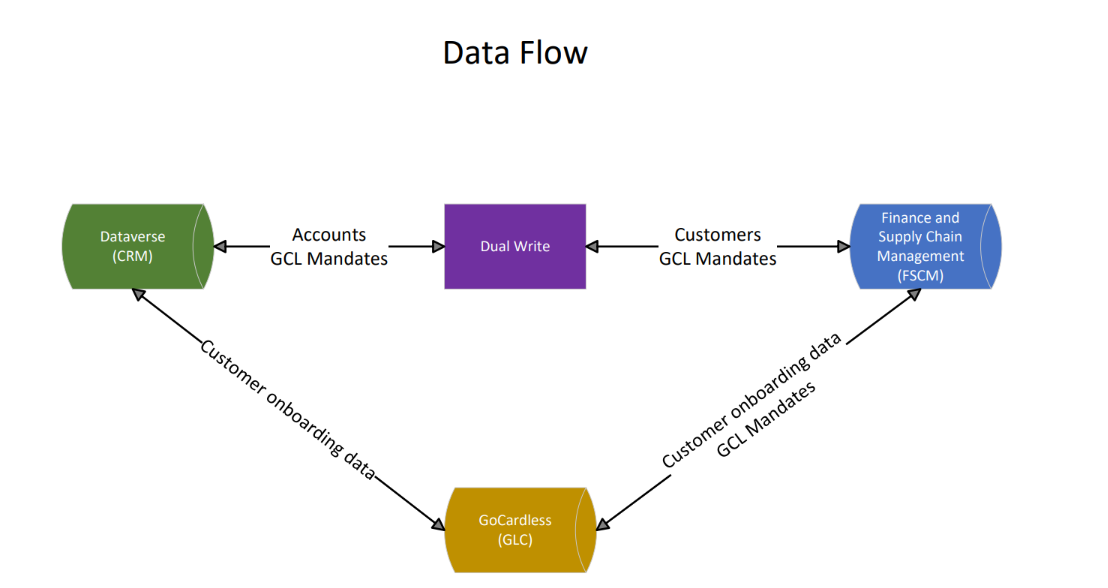
The flow chart below shows the GoCardless Merchant onboarding flow. As can be seen it is a rather simple process, which must be done from FSCM. When sending a request to generate the onboarding URL to GoCardless we also provide some metadata regarding the environment the URL was generated from, this is to ensure that the merchant token is returned to the correct environment. The merchant token is always stored encrypted as it is sensitive data, this also helps ensure that the token cannot be used on another environment in the case of database restores.
If you have a linked Dataverse environment with DualWrite configured, we also synchronize the encrypted token to Dataverse since there are scenarios where CRM needs the token to do API calls to GoCardless.
Customer onboarding from FSCM
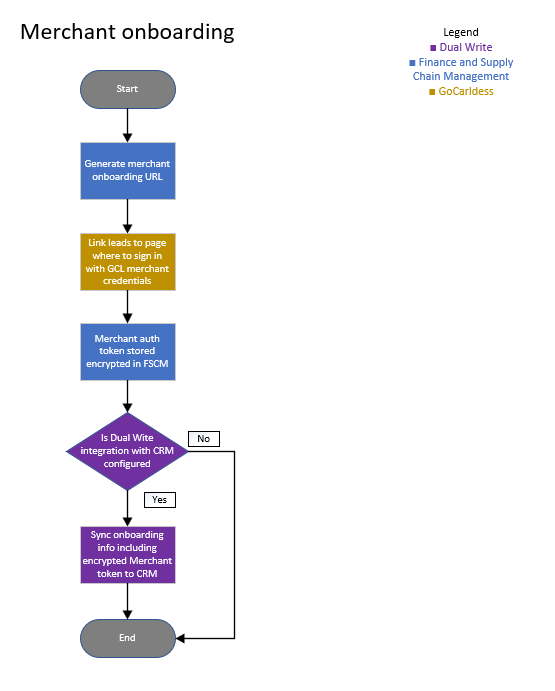
The flow chart below shows the GoCardless Customer onboarding flow from FSCM. This flow covers customer onboarding using a GoCardless onboarding URL. The process assumes that you do not have a linked Dataverse environment and are running TAPP in FSCM only. A separate flow further below shows the process when TAPP CRM is also in use.
The flow starts by creating a customer in FSCM and enabling the customer for GoCardless. Once enabled, an onboarding URL can be generated directly from the customer record.
This action sends an API request to GoCardless containing metadata that identifies both the customer and the FSCM environment. This metadata is used later in the process to link the created mandate back to the correct customer.
The generated URL is stored against the customer record in FSCM. The URL can either be shared with the customer manually or sent directly from FSCM. When the FSCM email option is used, an email containing the onboarding URL is sent to the customer using a fixed template through the standard FSCM SMTP configuration.
Once the customer completes the onboarding process via the URL and provides the required details to GoCardless, a Direct Debit mandate is created together with the metadata previously supplied by FSCM.
When the Mandate Reconciliation process is executed, FSCM retrieves the newly created mandate from GoCardless. Using the stored metadata, FSCM identifies the correct customer record and updates the customer with the new mandate, completing the onboarding process.
Customer onboarding from CRM
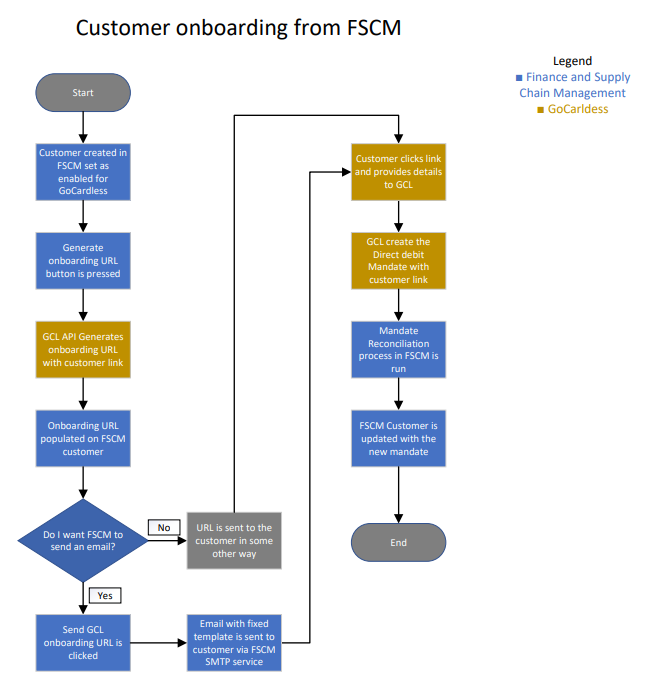
The flow chart below shows the GoCardless Customer onboarding flow from CRM. This flow covers customer onboarding using a GoCardless onboarding URL when CRM and FSCM are connected through DualWrite. The process assumes that the customer account is initially created in CRM and synchronized to FSCM as a customer record.
The flow starts by creating an account in CRM, which is instantly synchronized to FSCM through DualWrite. Then GoCardless Direct Debit can be enabled on the account and an onboarding URL can be generated directly from CRM.
This action sends an API request to GoCardless containing metadata that identifies both the customer and the originating environment. As this information is synchronized between CRM and FSCM through DualWrite, the metadata can later be used to link the created mandate back to the correct customer record in FSCM.
The generated URL is stored against the CRM account and synchronized to FSCM. The URL can either be shared with the customer manually or sent to the customer through FSCM. When the FSCM email option is used, an email containing the onboarding URL is sent to the customer using a fixed template through the standard FSCM SMTP configuration.
Once the customer completes the onboarding process via the URL and provides the required details to GoCardless, a Direct Debit mandate is created together with the metadata previously supplied during onboarding.
When the Mandate Reconciliation process is executed, FSCM retrieves the newly created mandate from GoCardless. Using the stored metadata, FSCM identifies the correct customer record and updates it with the new mandate. The mandate information is then synchronized back to CRM through DualWrite, ensuring that both systems remain aligned and completing the onboarding process.