
The below article gives an overview of the parameters used in Adyen for Dynamics 365 Business Central – TAPP and their definitions.
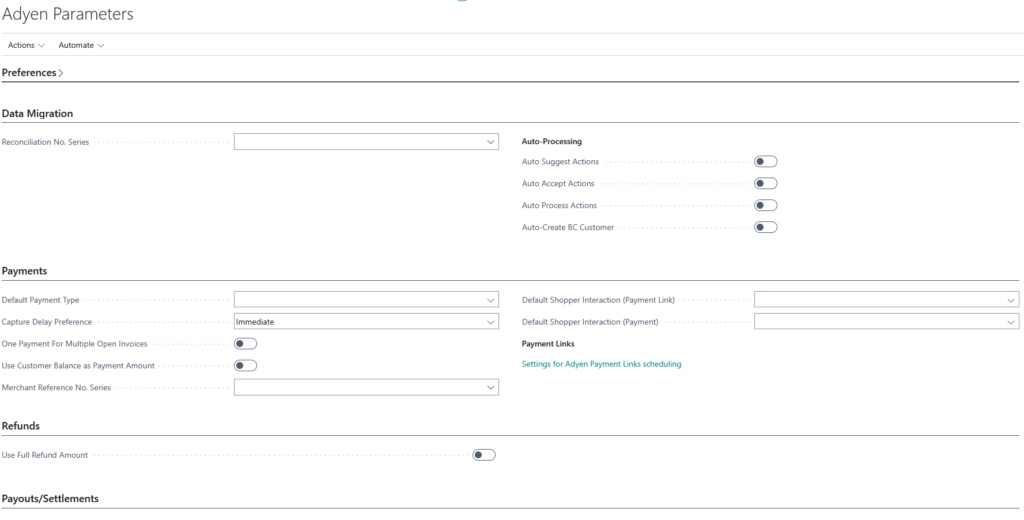
Preferences
| Field | Description |
|---|---|
| Use Default Merchant | Determines whether the default Adyen merchant configuration is used automatically instead of selecting a specific merchant per transaction. |
| Shopper Reference Preference | Defines which Business Central field is used as the Shopper Reference when new shoppers are created through TAPP Adyen. |
Data Migration
| Field | Description |
|---|---|
| Reconciliation No. Series | Specifies the number series used when generating reconciliation numbers during data synchronization and migration processes. |
| Auto Suggest Actions | Automatically suggests actions for synchronization records based on detected differences or issues. |
| Auto Accept Actions | Automatically accepts suggested synchronization actions without manual intervention. |
| Auto Process Actions | Automatically processes accepted synchronization actions. |
| Auto-Create BC Customer | Automatically creates a Business Central customer when the synchronization process determines that a new customer is required. |
Payments
| Field | Description |
|---|---|
| Default Payment Type | Specifies the default Adyen payment type that is preselected on Adyen-enabled sales documents. |
| Capture Delay Preference | Defines the logic used to calculate the capture delay date for Adyen payments. |
| One Payment for Multiple Open Invoices | When enabled, multiple open Adyen-enabled sales invoices are combined into a single payment when a new invoice is posted. |
| Use Customer Balance as Payment Amount | When enabled, the payment amount sent to Adyen will be the customer outstanding balance at the time of generating the payment request, instead of the sales document amount. The applicable balance field is determined by the currency of the sales document relative to the customer default currency. |
| Merchant Reference No. Series | Specifies the No. Series used to generate the merchant reference sent to Adyen on payment, onboarding, and payment link requests. When left blank, a GUID-based reference is generated automatically. |
| Default Shopper Interaction (Payment Link) | Specifies the default shopper interaction value sent to Adyen for payment link flows. Leave blank to let Adyen apply its own default. |
| Default Shopper Interaction (Payment) | Specifies the default shopper interaction value sent to Adyen for tokenised payment flows. Leave blank to let Adyen apply its own default. |
| Payment Link Scheduling Settings | Opens the Adyen Payment Links scheduling setup, where automated payment link generation and synchronization settings can be configured. |
Refunds
| Field | Description |
|---|---|
| Use Full Refund Amount | When issuing a refund, the full amount of the original payment is automatically used by default. |
Payouts / Settlements
| Field | Description |
|---|---|
| Payment (Cash Receipt) No. Series | Specifies the number series used when processing Adyen payouts in the cash receipt journal. |
| Cash Receipt Behaviour | Defines how cash receipt journals are handled when processing Adyen payouts. |
| Customer Journal Template | The default cash receipt journal template used when creating customer entries for Adyen payouts. |
| Customer Batch Name | The default batch name used within the selected customer journal template. |
| Default Cash Receipt Bank Account | Specifies the bank account that is used by default when creating cash receipt entries. |
| Fees Account | The G/L account used to post Adyen payout fees. |
| Vendor Journal Template | The default purchase journal template used when posting Adyen payout fees. |
| Vendor Batch Name | The default batch name used within the purchase journal template. |
| Adyen Vendor No. | The vendor number used when processing Adyen payout fees. The vendor must have a VAT business posting group configured. |
| Payment Vendor Journal Template | The default payment journal template used to process vendor payments related to Adyen payout fees. |
| Payment Vendor Batch Name | The default batch name used within the payment journal template. |
| Refund Application Preference | Specifies the preference to use when applying refunds related to Refund Funds Returned payout items. |
| Refund No. Series | The No. Series to use I the journal when processing the refunds in the payouts. |
| Chargeback Behaviour | Specifies the preference to use when processing chargebacks. |
| Chargeback No. Series | The No. Series to use in the journal when processing the payments charged back in the payouts. |