
The below article gives an overview of the parameters used in Adyen for Dynamics 365 Business Central – TAPP and their definitions.
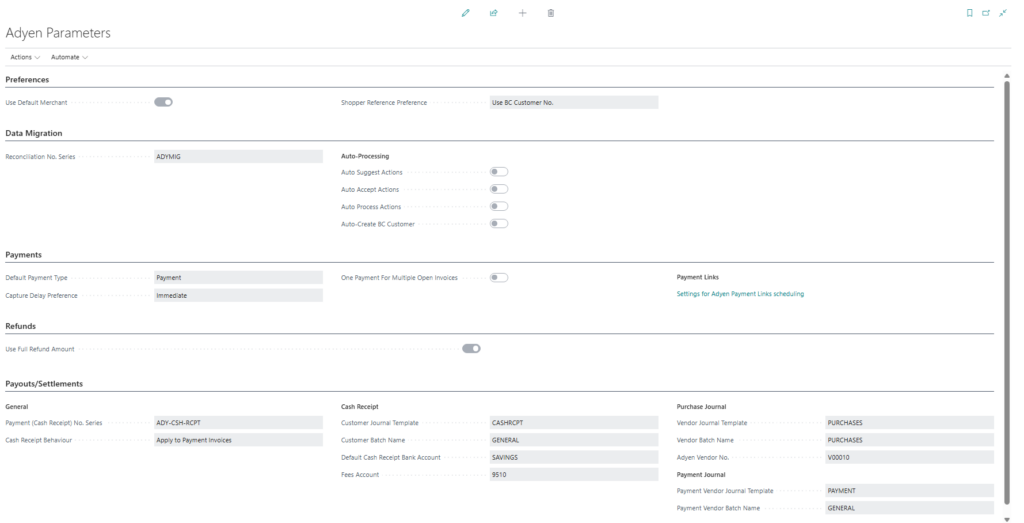
Preferences
| Field | Description |
|---|---|
| Use Default Merchant | Determines whether the default Adyen merchant configuration is used automatically instead of selecting a specific merchant per transaction. |
| Shopper Reference Preference | Defines which Business Central field is used as the Shopper Reference when new shoppers are created through TAPP Adyen. |
Data Migration
| Field | Description |
|---|---|
| Reconciliation No. Series | Specifies the number series used when generating reconciliation numbers during data synchronization and migration processes. |
| Auto Suggest Actions | Automatically suggests actions for synchronization records based on detected differences or issues. |
| Auto Accept Actions | Automatically accepts suggested synchronization actions without manual intervention. |
| Auto Process Actions | Automatically processes accepted synchronization actions. |
| Auto-Create BC Customer | Automatically creates a Business Central customer when the synchronization process determines that a new customer is required. |
Payments
| Field | Description |
|---|---|
| Default Payment Type | Specifies the default Adyen payment type that is preselected on Adyen-enabled sales documents. |
| Capture Delay Preference | Defines the logic used to calculate the capture delay date for Adyen payments. |
| One Payment for Multiple Open Invoices | When enabled, multiple open Adyen-enabled sales invoices are combined into a single payment when a new invoice is posted. |
| Payment Link Scheduling Settings | Opens the Adyen Payment Links scheduling setup, where automated payment link generation and synchronization settings can be configured. |
Refunds
| Field | Description |
|---|---|
| Use Full Refund Amount | When issuing a refund, the full amount of the original payment is automatically used by default. |
Payouts / Settlements
| Field | Description |
|---|---|
| Payment (Cash Receipt) No. Series | Specifies the number series used when processing Adyen payouts in the cash receipt journal. |
| Cash Receipt Behaviour | Defines how cash receipt journals are handled when processing Adyen payouts. |
| Customer Journal Template | The default cash receipt journal template used when creating customer entries for Adyen payouts. |
| Customer Batch Name | The default batch name used within the selected customer journal template. |
| Default Cash Receipt Bank Account | Specifies the bank account that is used by default when creating cash receipt entries. |
| Fees Account | The G/L account used to post Adyen payout fees. |
| Vendor Journal Template | The default purchase journal template used when posting Adyen payout fees. |
| Vendor Batch Name | The default batch name used within the purchase journal template. |
| Adyen Vendor No. | The vendor number used when processing Adyen payout fees. The vendor must have a VAT business posting group configured. |
| Payment Vendor Journal Template | The default payment journal template used to process vendor payments related to Adyen payout fees. |
| Payment Vendor Batch Name | The default batch name used within the payment journal template. |