
Overview
Price Indexing allows LISA Business to automatically update subscription prices over time using rules:
- Standard BC price updates
- Percentage increases (Index-based)
- Percentage increases defined on Items (Item-based Index)
- Block periods by date or cycle
- Group-specific rules
These updates are executed by the Refresh Prices batch job.
Promotions allow LISA Business to automatically clear temporary promotional pricing for a subscription (e.g. first three months free) which are very common in some industries such as Telco.
The Subscription Processor batch job clears discounts automatically after X cycles as per item-specific configuration.
Business Value
The Price Indexing feature in LISA Business delivers significant commercial and operational value by automating dynamic price adjustments directly within Microsoft Dynamics 365 Business Central subscription workflows. It enables organisations to systematically manage price evolution over time. This can be done through standard Business Central price updates, rule-based percentage increases and item-specific indexing. This capability ensures pricing remains aligned with market conditions, contractual commitments and strategic pricing policies, while also supporting scenarios around Subscription Price Promotions through the functionality of automatic discount clearing after defined billing cycles. By embedding this logic into scheduled refresh jobs, the feature eliminates repetitive administrative tasks, enhances pricing accuracy and consistency across customer segments, and reduces compliance risk related to manual price maintenance. Ultimately, it increases operational efficiency, strengthens revenue sustainability, and supports scalable subscription growth by ensuring prices evolve predictably and transparently across the lifecycle of subscription plans.
Configuration
Enable Price Indexing by Default
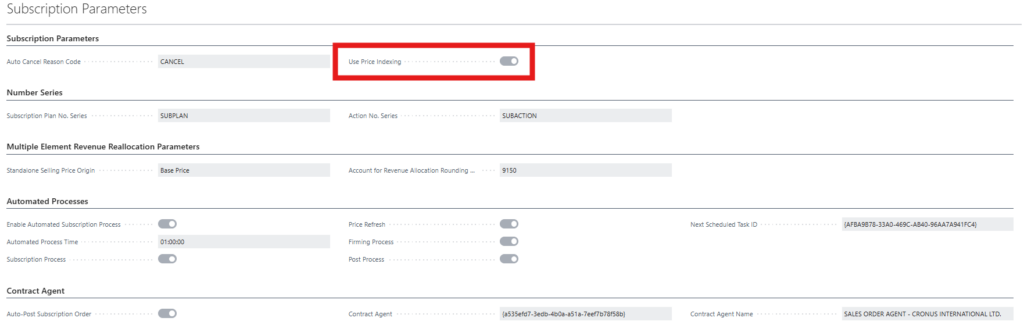
This ensures all new Subscription Plans use indexing by default.
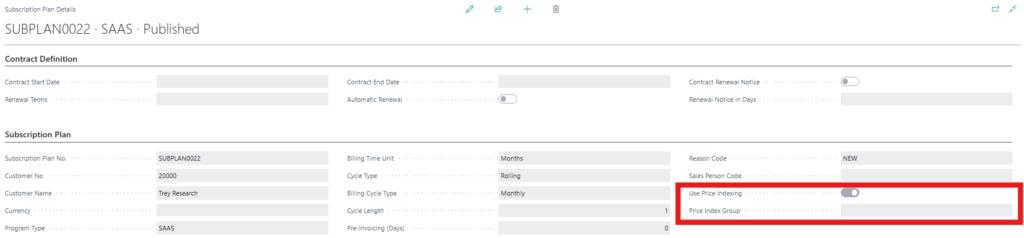
Subscription Plan Header
When creating a plan:
- Use Price Indexing (Header) inherits the default.
- Price Indexing Group is inherited from the customer, if configured there.
- Users may override it until the plan is published.
Subscription Plan Line
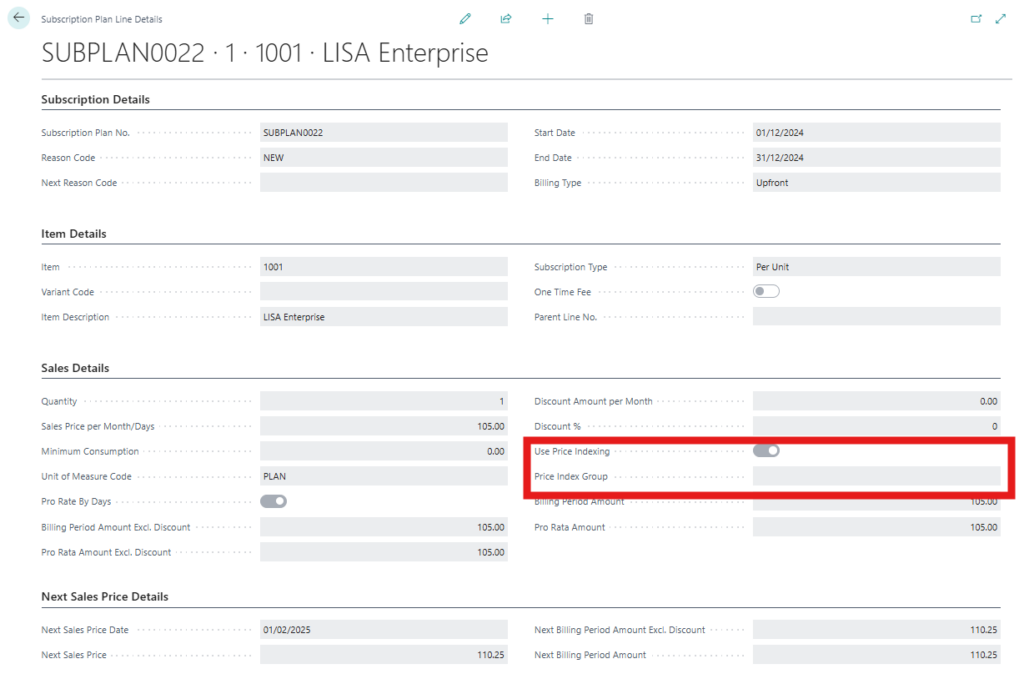
Each plan line includes:
- Use Price Indexing (Line)
- Inherits from header.
- Can be manually toggled.
- If OFF, line is ignored by all indexing logic.
- Price Index Group Code
- Auto-inherited from the parent Subscription Plan
- This field is optional and only necessary if you configure one of the price indexing to use price indexing groups.
- Can be overridden if plan is un-published.
Price Indexing Groups
Price Indexing Groups are just a logical grouping with a code and a description. They allow for a subset of customers to be linked to price indexing groups. This adds flexibility to the configuration as the customer subsets for price indexing purposes are independent from the standard customer groups of Microsoft Dynamics 365 Business Central.

How they work:
- Price Indexing Group created
- Group assigned to Customer
- When Plan created → inherits customer’s group
- When Plan Line created → inherits from plan
- Users may override before plan is published
- Used when Level = Price Indexing Group
- Price Indexing Setup record might reference a Price Indexing Group
- If this is the case and matches the Price Indexing Group on the Subscription Plan line, the price index is applied.

Item Table – Additional Fields
On Item Card:
Price Index %
Used when Price Refresh Type = Item-based Index.
Clear Discount After Cycles
If non-zero, discounts on plan lines are cleared after X billing cycles.
This field also exists on:
- Subscription Plan Line
- Quote / Sales Line
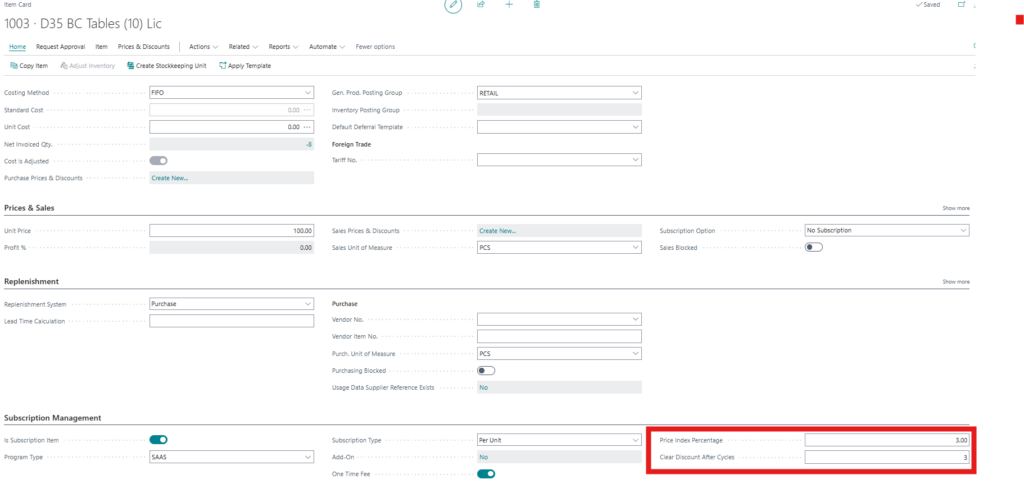
The discounts are automatically cleared on a subscription plan line by the Subscription Processor batch job.
Price Indexing Setup

Each record defines one rule.
Only the first matching rule by priority applies.
Key fields to maintain:
Priority
- Lower = higher priority
- Use Move Up / Move Down actions
Level & Value
Determines what the rule applies to:
- Item
- Subscription Plan
- Program Type
- Customer
- Customer Group
- Price Indexing Group
- All
Block Until Type
- None – no freeze
- Date-based – freeze until specific date
- Billing cycle-based – freeze until cycle count reached
Price Refresh Type
- Standard → use BC price lists / item prices
- Index-based → use Index % from this record
- Item-based Index → use Price Index % from Item table
Index %
Required when Refresh Type = Index-based.
Index Target
- Sales price per month
- Billing period amount
(Editable only for Index-based & Item-based Index.)
Status
- Active (requires confirmation dialog)
- Inactive (ignored by Refresh Prices job)
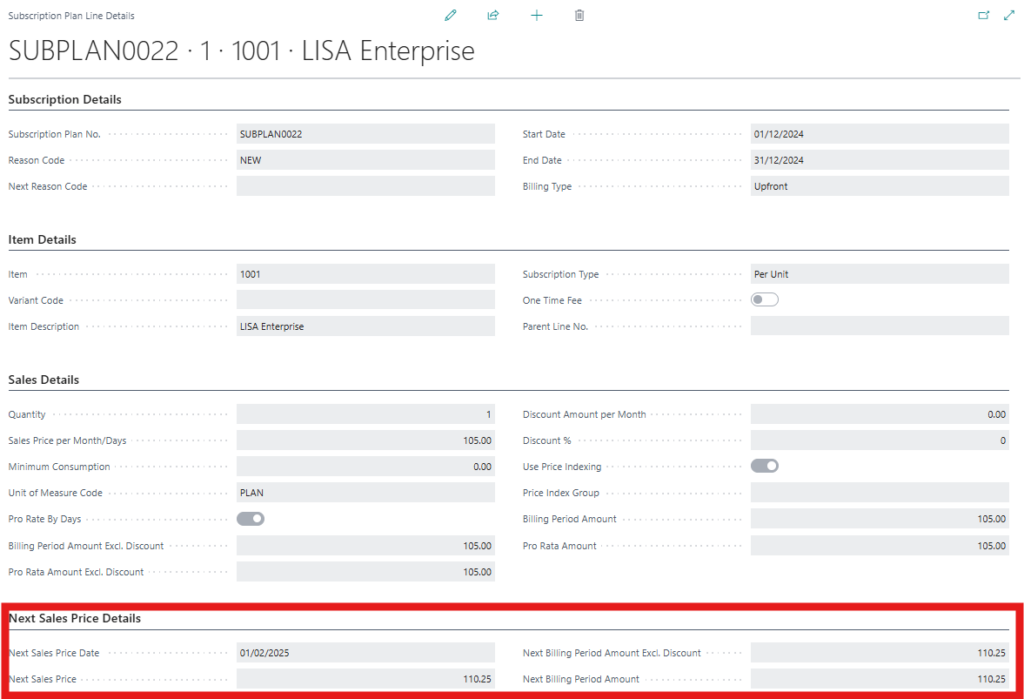
“Next …” Pricing Fields on Subscription Plan Line
When indexing is active:
- Next Sales Price Date – shows when the next price index or price change will be applied to this subscription plan line.
- Next Sales Price – The value of the next sales price as per the activated price indexing configuration.
- Next Billing Period Amount Excl. Discount – The value of the next billing period amount before discount as per the activated price indexing configuration.
- Next Billing Period Amount – The value of the next billing period amount after discount as per the activated price indexing configuration.
These are updated automatically by the Refresh Prices job.
Batch Jobs
Subscription Processor
Runs billing cycle logic.
During this process:
- Cycle count is incremented.
- If Clear Discount After Cycles reached → all discounts cleared.
- Even if multiple cycles processed in one run, discount clearing still triggers at correct cycle.
Refresh Prices Job
Navigation: Run Refresh Prices or via Job Queue.
What it does:
- Loops all Subscription Plan Lines with Use Price Indexing = TRUE
- Matches against active Price Indexing Setup
- Applies block rules
- Adjusts price using Standard, Index-based, or Item-based Index logic
- Updates price fields + all “Next …” fields
Recommended: Schedule daily.