
In Business Central, when a sales document is posted, the standard posting routine deletes the original document (e.g., records in the Sales Header and Sales Line tables).
If these tables are integrated with Dataverse, this deletion can trigger corresponding delete operations in Dataverse, potentially leading to data inconsistencies.
To prevent this, the integrator can be configured to skip deletion and instead update the corresponding record in Dataverse after posting.
Configuring the Integrator to Skip Deletions
Follow these steps to enable and configure this behavior:
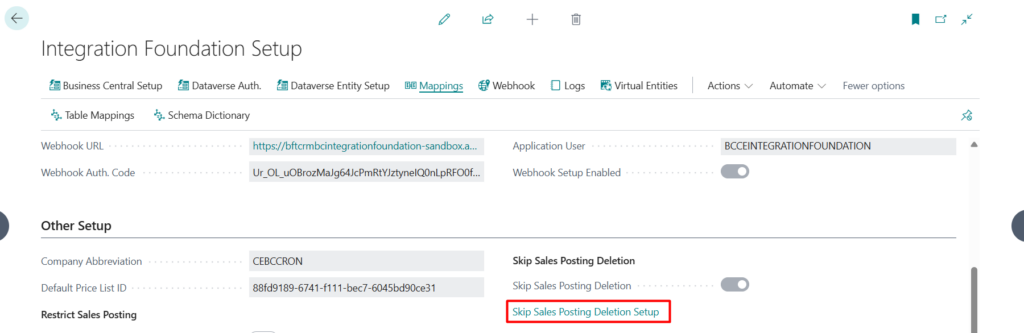
- Navigate to the Integration Foundation Setup page.
- In the Other Setup FastTab, enable Skip Sales Posting Deletion.
- Click Skip Sales Posting Deletion Setup to define how Dataverse records should be updated after posting.
Defining Update Behavior
For each update to be applied to the Dataverse record:
- Select the Document Type the rule applies to.
- Specify the Dataverse Entity Logical Name.
- Choose the Dataverse Field Name to be updated.
- Set the value based on the field type:
- For Picklist, State, or Status fields: specify the Dataverse Default Picklist Value.
- For all other field types: enter the Dataverse Default Value.

This configuration ensures that, instead of deleting records in Dataverse, relevant fields are updated to reflect the posted state of the document, maintaining data consistency across systems.