
Overview
The Consumption Subscription feature enables organisations to bill customers based on actual or estimated usage rather than fixed quantities. It supports both manual consumption entry and automated billing from meter readings, while integrating seamlessly with existing subscription, invoicing, and posting processes.
Consumption subscriptions are always billed in arrears and can coexist with traditional per-unit subscription lines within the same subscription plan. This flexibility allows businesses to support a wide range of commercial models, including utilities, telecommunications, SaaS usage-based pricing, and IoT-driven services.
Business Value
The Consumption Subscription feature delivers measurable business value across revenue accuracy, operational efficiency, and customer transparency.
From a revenue perspective, it ensures that customers are billed strictly according to actual or contractually agreed minimum consumption, reducing leakage caused by underbilling or incorrect estimates. Minimum consumption thresholds protect baseline revenue while still allowing flexibility for variable usage.
Operationally, the feature reduces manual effort by automating the capture, aggregation, and billing of consumption data where meters are used. Clear validation rules and system-enforced controls lower the risk of billing errors and rework.
From a customer experience standpoint, the ability to distinguish between estimated and actual consumption, combined with optional itemised invoicing, improves billing transparency and trust. This is particularly important in regulated or high-volume usage environments where billing disputes are common.
Overall, the feature enables scalable, auditable, and usage-driven billing without disrupting existing subscription and posting processes.
Configuration of Subscription Plan Lines
To configure a consumption-based subscription, begin by creating or editing a Subscription Plan.
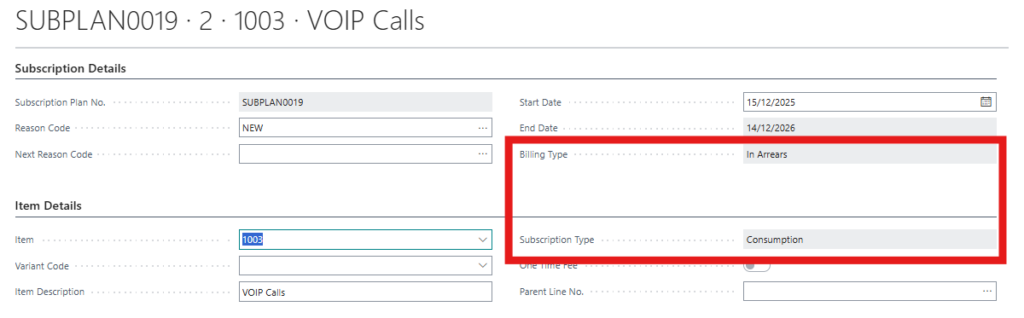
On the item card, one needs to configure if a specific item is sold on a Per Unit basis or Consumption. To create a consumption item set the Subscription Type field to Consumption.

On each Subscription Plan Line, select an item with Subscription Type = Consumption. Consumption lines can exist alongside per-unit lines within the same plan.
A read-only indicator displays the billing mode:
- Consumption lines always show In Arrears
- Per-unit lines show Upfront
This indicator is informational only and does not require configuration.
For consumption lines, define the Minimum Consumption value. This represents the minimum amount that can be billed for the period, regardless of actual usage.
Ensure that the Pro Rata Amount is equal to or greater than the Minimum Consumption. The system prevents saving the plan line if this rule is violated. For consumption subscriptions, pro-rata logic is not applied during billing; the pro-rata amount is used only as a reference or estimate.
The Quantity field is automatically set to 1 and is read-only. Any quantity provided from sales orders, APIs, or integrations is ignored for consumption lines.
All discount-related fields on the Subscription Plan Line are set to zero and are read-only. Discounts are handled at the action level, not at plan configuration.
If usage is to be billed from a meter, link a Customer Meter to the consumption plan line. Only meters belonging to the same customer are selectable, and a meter can be linked to only one consumption plan line at a time. Meter links can be changed only while the plan is unpublished.
Creation of Subscription Actions
Consumption subscription actions are generated automatically in arrears. For example, an action covering January is created on or after the first day of February.
When an action is created:
- Gross Amount and Line Amount are populated as estimates
- To Bill Consumption Value is set to 0
- Is Estimate is set to true
If the consumption plan line is linked to a customer meter, the system attempts to aggregate eligible meter readings for the action period. Only readings that are not yet billed and that meet quality and date criteria are considered.
If actual or final readings are found, their billed quantities are aggregated and priced automatically. If no such readings exist, the system falls back to estimated readings. If no readings are available at all, the action remains an estimate with no consumption value populated.
Meter readings captured for billing are marked accordingly and linked to the subscription action to prevent duplicate billing.
Managing Subscription Actions in the Subscription Cockpit
Users manage consumption billing primarily through the Subscription Cockpit.
Each unfirmed consumption action includes the To Bill Consumption Value field, which can be populated in three ways:
- Manually entered by the user
- Automatically set using Bill Estimate, which copies the estimated amount from the plan line
- Automatically set using Bill Minimum, which copies the minimum consumption value
The Is Estimate flag indicates whether the billed value is estimated or actual. Users can manually toggle this flag for unfirmed actions unless the value originates from meter readings.
Actions cannot be firmed if the To Bill Consumption Value is zero. This ensures that no consumption action is invoiced without an explicit billing value.
If discounts are changed on an unfirmed consumption action that already has a To Bill Consumption Value, the system prompts whether the discount should also be applied to the consumption value. In automated or API-based updates, the discount is applied automatically.
The system also enforces that the Gross Amount of the action cannot be lower than the Minimum Consumption defined on the plan line.
When actions originate from meter readings, users can view all captured meter readings directly from the Subscription Cockpit via a dedicated action button.
Firming and Posting Consumption Actions
During the firming process, consumption actions are validated to ensure a non-zero To Bill Consumption Value.
For consumption subscriptions, the billed amount is taken from the To Bill Consumption Value, not from the Line Amount. This differs from per-unit subscriptions, where the Line Amount remains the billing basis.
Posting follows the standard invoicing process. Once a consumption action is posted:
- The related invoice reflects the To Bill Consumption Value
- Any meter readings linked to the action are marked as Billed
No additional posting configuration is required.
Sales Invoice Printing and Itemised Consumption
When printing a sales invoice that includes consumption-based subscription lines, users are offered an option to print an itemised invoice.
If selected, the invoice includes a detailed breakdown of consumption sourced from meter readings, such as:
- Meter or service point
- Consumption period
- Billed quantity and unit of measure
- Price per unit
- Amount per reading
Totals in the itemised section reconcile exactly with the invoice line amounts. Non-consumption lines remain unaffected and are printed normally.
Summary
The Consumption Subscription feature enables accurate, flexible, and scalable usage-based billing while maintaining strong system controls and auditability. By combining manual overrides, minimum safeguards, and automated meter integration, it supports a wide range of commercial and operational scenarios without increasing complexity for end users.