
Introduction
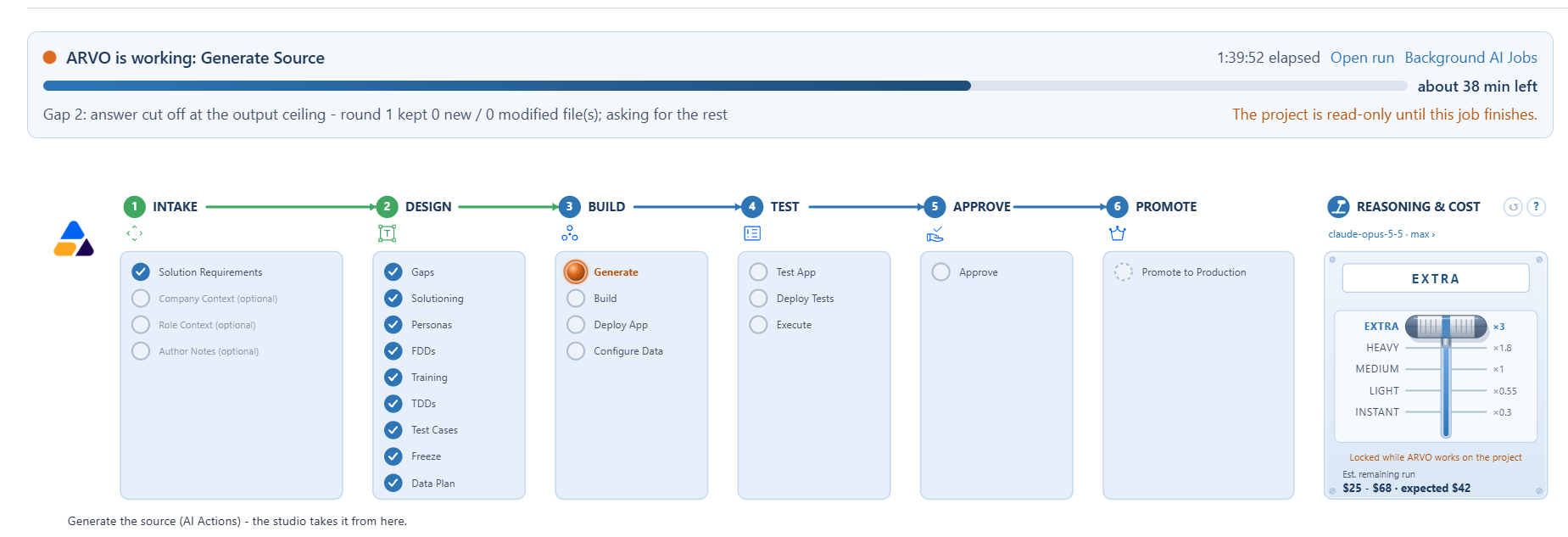
The Compass runs across the top of every project and it is the mental model for the whole product. Once you can read it, you always know where a project has reached, what has been completed and what you are being asked to do next. This article explains how to read it.
How a project moves through the Compass
A project moves from left to right through the stages. Each stage contains named steps, so the Compass shows both the broad shape of the journey and the detail of where you are within it. Nothing jumps ahead: work reaches a stage only once the stages before it are satisfied.
As work is completed, the steps fill in, and the step you are currently on is highlighted. That gives you the whole position at a glance, without opening records or reading through history.
Go To Next Step
Go To Next Step takes you to the next required action. If you are ever unsure what to do with a project, this is the safest thing to choose, because it moves you to the action the project is actually waiting for.
The Reasoning Lever
Alongside the Compass, the reasoning lever shows the reasoning configuration selected for the run.
ARVO Studio provides predefined reasoning levels based on the defaults configured in the setup. Selecting a level applies the corresponding standard configuration.
You can override individual reasoning parameters when needed. If a parameter is changed so that the configuration no longer matches the selected level, the lever changes to Custom. This indicates that the run is using an individually adjusted configuration rather than one of the standard reasoning level configurations.
After changing the reasoning configuration, use the cost re estimation option to review the updated estimate.