
Prerequisites
Before the LISA Business – Contract Copilot Agent can be used, the follow requirements must be satisfied:
- You must be running the cloud SaaS version of Microsoft Dynamics 365 Business Central 27.1 or later
- You have to install the LISA Business App and go through all the deployment and configuration steps. These can be found here.
- You must configure the standard Microsoft Sales Order Coplot Agent. This can be found here.
- Beyond the free monthly usage provided by Microsoft, you must also purchase Copilot credit packs or link your environment to an Azure Subscription via Power Platform Admin Center. This also applies to sandbox environments. More info can be found here.
In the standard configuration wizard of the sales order copilot agent you intend to use as the contract copilot agent, the configuration in the Create sales documents section should be set as per below.
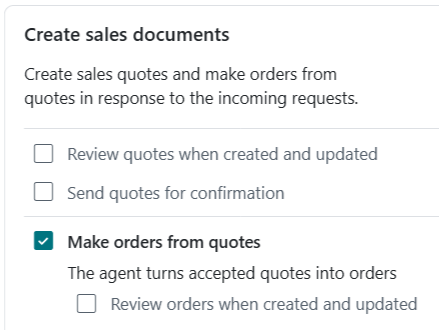
Configuration
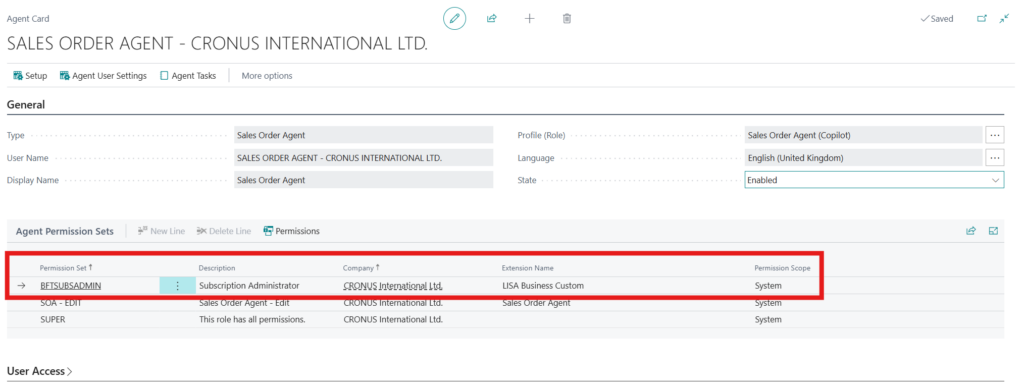
The first configuration step would be to assign the appropriate permission set to the sales order agent which you want to use as your contract copilot agent. This can be done by navigating to the Agents page, selecting the sales order agent that will be used to ingest contract documents and assigning the Subscription Administration permission set.
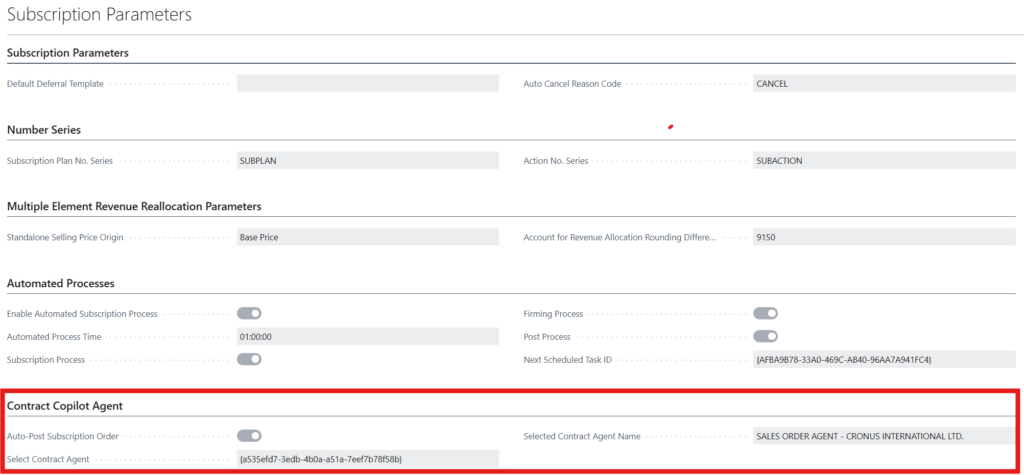
The next configuration step would be to navigate to the LISA Business Setup -> Subscription Parameters form -> Contract Copilot Agent.
In this section of the parameters form:
- Auto-Post Subscription Order must be set to true. This is a company-wide toggle which enables the automatic posting of Subscription Sales Orders created by the contract copilot agent. This will subsequently trigger the automatic creation of a new subscription plan or changes an existing subscription plan. If this field is set to false, a subscription sales order is still created by the contract copilot agent but this would need to be manually invoiced in order to trigger the orchestration of subscription plans.
- Since, there could be multiple copilot agent in one Microsoft Dynamics 365 Business Central environment, in the Contract Agent field one must select the specific copilot agent that will trigger the automatic posting of sales order and orchestration of subscription plans. As outlined above, it is important to ensure that the Subscription Administration permission set has been assigned to the agent selected here.
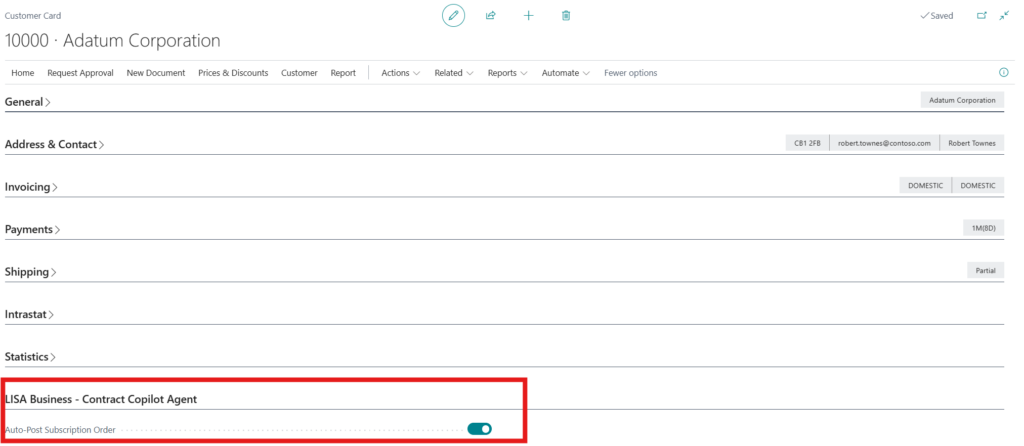
The final configuration step can be found on the customer record. Since the automated invoicing of sales orders and subsequent creation/updating of a subscription plan might only apply to a specific set of customers, over and above the company-wide Auto-Post Subscription Order toggle, this toggle must also be enabled per customer on the customer record. This allows granular control on this copilot-driven process. The field can be found on the customer card.
Although 100% supported by the solution, emails with contract changes are typically not sent directly by the customer. Therefore, specifically for contracts, it is advisable to create a process where contracts originate from the email address of a Contract Hub. This email address should be configured in the Subscription Parameters. An example of how this could be implemented is by using a Microsoft OneDrive folder where sales people or accounts manager drag and drop their signed documents and Microsoft Power Automate to auto-forward the files to the email address the Copilot agent is monitoring.
When the Auto-Post Subscription Order is set to true, a contact is automatically created on the customer with the email address of the Contract Hub configured in the Subscription Parameters (if this field is populated). This makes it easier for the Copilot agent logic to locate the customer by contact email address and then selecting the right customer based on the information found within the email or document attachment. Without the automatic creation of this contact, the customer will not be found when filtering by the email address of the Contract Hub.